
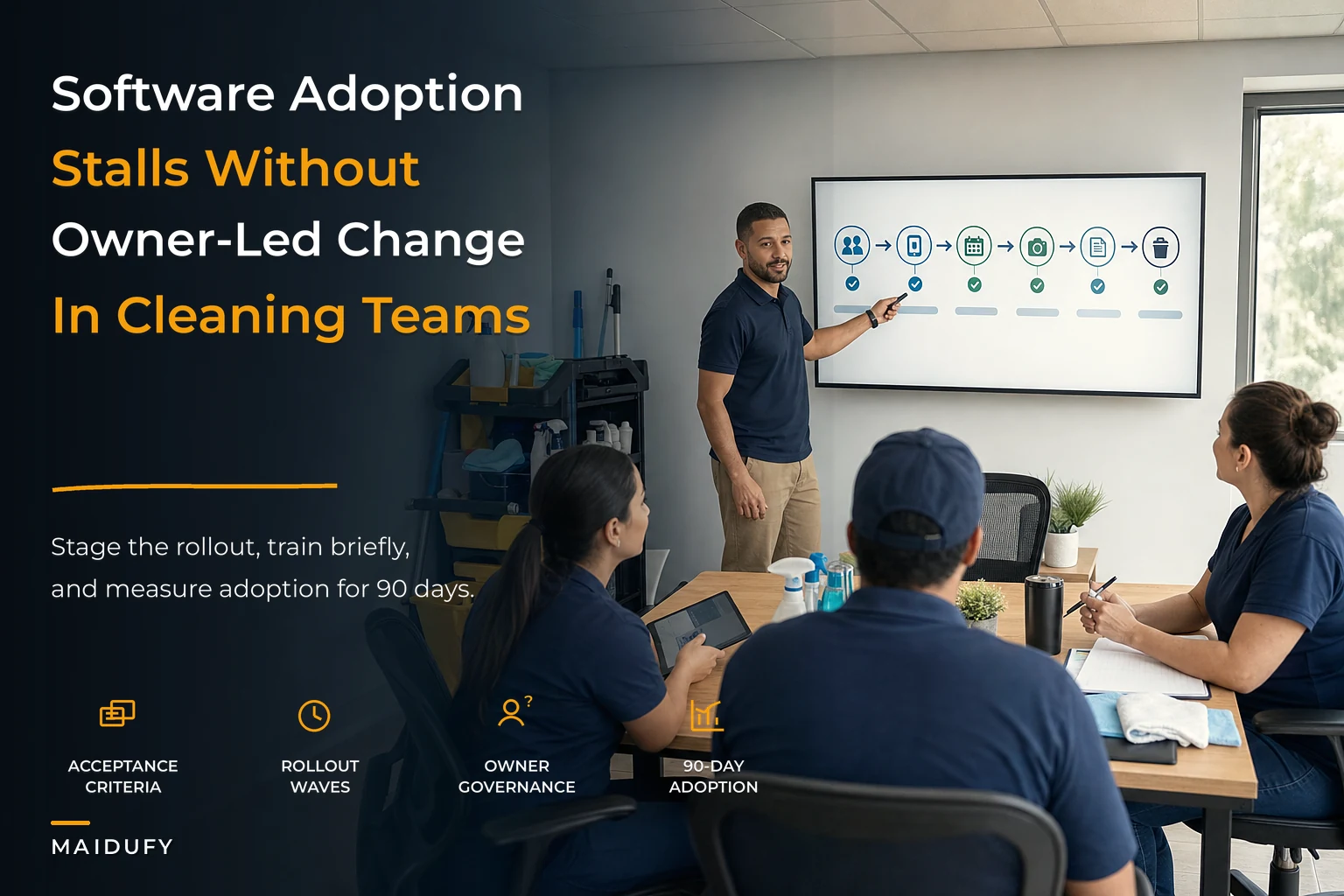

Most software rollouts in cleaning businesses don't fail because the software was bad. They fail because nobody owned the rollout. The owner signed the contract, forwarded a login email to the team, and assumed the tool would install its own habits. Three weeks later crews are back on group texts, the office is still tracking jobs in a spreadsheet, and the shiny new platform is a $200/month reminder of good intentions.
This is a playbook about the owner's job during a software change — not which vendor to pick. Vendor selection is maybe 20% of the outcome. The other 80% is how you set acceptance criteria before you buy, how you stage the rollout, how you train in short bursts, how you reward the people who actually adopt it, and what you do when something breaks in week two. Get that governance layer right and almost any competent platform will work. Get it wrong and the best software on the market will still rot.
Below is the whole system the way it actually plays out — plus the copyable rituals, the governance checklist, and the 90-day KPI dashboard.
Why adoption breaks in cleaning businesses specifically
Cleaning is a distributed, low-screen-time business. Your team spends the day with gloves on, kneeling in bathrooms, driving between houses. That's a fundamentally different adoption environment than an office where everyone stares at a monitor for eight hours.
-
The office adopts, the field doesn't. The owner and admin learn the tool because they're at a desk. Cleaners never get past the login screen, so the data going into the system stays thin — and thin data makes the whole thing feel useless.
-
The tool gets adopted for one thing and ignored for everything else. Crews will happily clock in on an app but refuse to log checklist items or upload photos. Now you have half a system, which is often worse than no system because you think you have coverage.
-
Adoption depends entirely on one person. Usually a sharp lead cleaner or office manager who "gets it." They leave, and the whole practice evaporates within a month.
What makes this worse is that most owners try to change too much at once. They buy an all-in-one platform and flip on scheduling, invoicing, time tracking, QA checklists, client messaging, and payroll in the same week. The team can't absorb six new behaviors simultaneously. Everything gets done badly, the owner concludes the software doesn't work for them, and they churn. This overlaps heavily with the broader pattern covered in technology mistakes that stall cleaning businesses — the tooling is rarely the actual problem.
The fix isn't more training videos. It's treating adoption as an operations project with an owner, a timeline, acceptance criteria, and consequences.
Step one: Write pre-buy acceptance criteria before you talk to any vendor
The mistake almost everyone makes — they let the demo define what "good" looks like. The salesperson shows you a beautiful dashboard, you get excited, and suddenly your criteria become "does it do the thing I saw in the demo." That's backwards.
Never miss a cleaning appointment again.
Maidufy helps you book, confirm, and manage every cleaning service seamlessly.
- Centralized booking management
- Automated client reminders
- Optimized staff scheduling
No credit card required
Write down what the tool must do for your operation before you see a single demo. Keep it to the handful of workflows that actually move money or cause pain. For a cleaning business that's usually scheduling, field time capture, QA/proof-of-service, and client communication.
Good acceptance criteria are testable. Not "easy to use" — that's meaningless. Instead:
-
A cleaner with no training can clock in and out in under 20 seconds on their own phone.
-
An admin can reschedule a recurring job and have the client notified automatically in under a minute.
-
The owner can pull last week's completed-vs-scheduled jobs in two clicks without exporting anything.
-
A photo attached in the field is visible to the office within a couple of minutes, not at end of day.
These are pass/fail. During the trial, you literally test each one and mark it. This does two things: it protects you from buying on vibes, and it gives you your first draft of what you'll later train the team on. If a criterion can't be met, that's either a dealbreaker or a documented workaround you build a ritual around later.
One more thing owners skip: write down what the tool needs to connect to. If your new platform can't talk to your accounting software or your payment processor, you're signing up for double entry forever. The vendor-agnostic integration blueprint goes deep on this and is worth reading before you commit — integration gaps are the quiet killer of adoption, because every manual re-entry step is a place the system decays.
Step two: Stage the rollout so the team absorbs one habit at a time
The core principle: sequence, don't dump. Turn on features in waves, and don't move to the next wave until the previous one is actually sticking.
Here's a rollout sequence that works well for most 1–50 person cleaning operations:
| Wave | Window | What you turn on | Who's involved | "Done" looks like |
|---|---|---|---|---|
| 0 | Week 0 | Owner + admin setup, data import, criteria testing | Owner, admin | Acceptance criteria all tested and passed |
| 1 | Weeks 1–2 | Field clock in/out only | 1 pilot crew | Pilot crew clocking in with zero reminders |
| 2 | Weeks 3–4 | Scheduling + client notifications | Office + all crews | 90%+ of jobs live in the system, not the spreadsheet |
| 3 | Weeks 5–6 | QA checklists + proof-of-service photos | All crews | Every completed job has a checklist or photo |
| 4 | Weeks 7–8 | Invoicing / payment sync | Office | No parallel spreadsheet billing |
| 5 | Weeks 9–12 | Reporting, refinement, retire old tools | Owner | Old tools officially shut off |
The pilot crew in Wave 1 matters more than people realize. Pick your most reliable, least tech-resistant crew — not your most tech-savvy one. You want proof that a normal team can do it, because that's what convinces the skeptics. When your steady, ordinary crew is clocking in without complaint, the "this is too complicated" excuse dies.
Here's a simple visual of the staged rollout process.
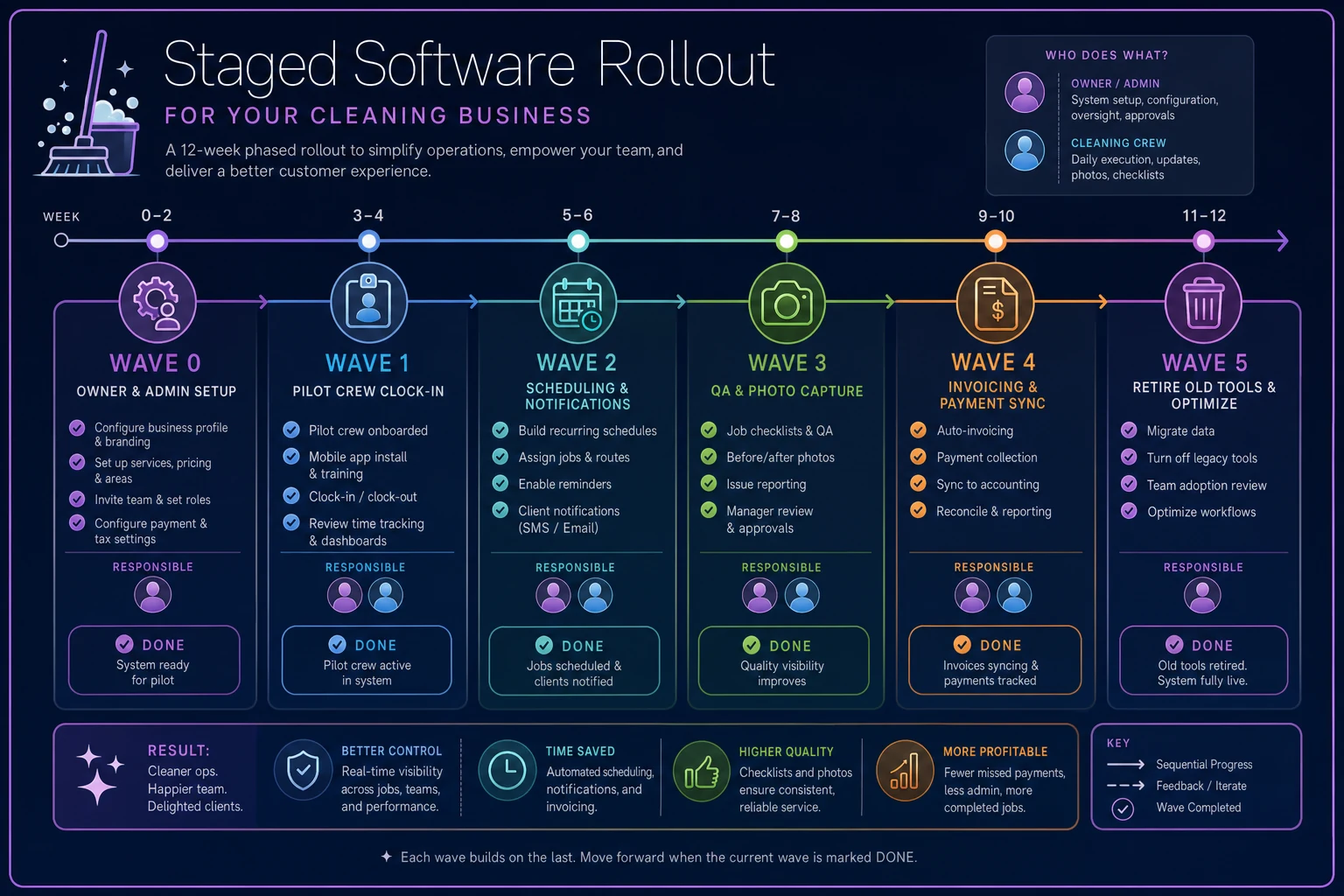
The hard discipline is refusing to advance. If Wave 2 isn't sticking, you do not turn on QA checklists. Adding more when the base isn't solid just spreads the failure. A slow, boring 12-week rollout beats a fast one that collapses in three.
Step three: Short training rituals that fit how cleaners actually work
Nobody on your crew is going to watch a 40-minute onboarding webinar. Training for a field team has to be short, repeated, and tied to a real moment in their day.
The format that works is a micro-ritual — under five minutes, done at a natural gathering point, focused on exactly one behavior.
-
The Monday huddle demo (3–5 min). Once a week during your normal team gathering, one person demos the single behavior that's currently in rollout. Not the whole app. Just "here's how you upload the after-photo." Then everyone does it once, right there.
-
The buddy pairing. For each crew, name one "app buddy" who got hands-on early. New behaviors route through them first. This distributes support so it's not all landing on the owner's phone at 7am.
-
The one-card reference. A single laminated card or pinned phone note per behavior: three steps, max. "1. Open job. 2. Tap complete. 3. Add photo." That's it. If your reference needs a second card, the behavior is too complicated — simplify it before you train it.
-
The end-of-day check-in (first two weeks only). Admin scans the day's entries and texts anyone who missed a step a friendly, specific nudge: "Hey, the Johnson job didn't get a checklist — can you add it before tomorrow?" This is temporary scaffolding. Drop it once compliance is habitual, or it just becomes nagging.
If your reference needs a second card, simplify the behavior before training.
The thing most owners miss: training is not an event, it's a cadence. People forget. New hires arrive. The buddy leaves. If training only happened during rollout week, adoption decays the moment your original crew turns over. Bake a two-minute software segment into your standard new-hire onboarding permanently.
Step four: Incentives that reward the behavior, not the outcome
Software adoption is a behavior change, and behavior changes need reinforcement — but most owners incentivize the wrong thing. They tie a bonus to some big outcome like customer retention, which is influenced by a hundred different factors. The team can't draw a line between "I logged my checklist" and "we hit our retention number," so the incentive does nothing.
Reward the behavior directly and quickly.
-
The clean-data streak. Any crew that logs 100% of jobs with complete entries for a full week gets something small and immediate — first pick of routes next week, a $25 gift card, an early Friday. Small and frequent beats big and distant.
-
The buddy bonus. The app buddy gets a modest monthly stipend (somewhere in the $50–$75 range) for keeping their crew's compliance up. You're paying for distributed support, which is cheaper than the owner handling it all.
-
The "shut it off" milestone. When the team hits a rollout milestone — like fully retiring the old spreadsheet — do a visible team-wide reward. A lunch, whatever. It marks the transition and signals there's no going back.
Be clear about the flip side too, without making it punitive. At some point, using the system stops being optional. There's a moment — usually around week 6 — where "I forgot" is no longer acceptable because the habit has had time to form. Owners who never draw that line end up with permanent half-adoption. State it plainly: after the grace period, logging jobs in the system is simply part of the job.
Step five: Failure-mode runbooks so week-two problems don't kill the rollout
Every rollout hits friction. The difference between one that survives and one that dies is whether the owner has a pre-planned response, or panics and lets the team drift back to old habits.
Write short runbooks for the failure modes you know are coming — because they're the same ones every time:
Failure: A crew stops logging mid-week.
-
Check first
is it a phone/app problem or a behavior problem? Don't assume laziness.
-
If technical
the buddy handles it same-day; escalate to owner only if unresolved in 24 hours.
-
If behavioral
owner has a direct, short conversation — not a group message. Group shaming backfires.
Failure: The data going in is wrong (wrong job marked complete, photos of the wrong room).
-
This usually means the workflow is confusing, not that the person is careless. Simplify the step before you correct the person.
-
Add a one-line clarification to the reference card.
Failure: A key integration breaks and jobs aren't syncing to billing.
-
Have a documented fallback
what's the manual process for the day, and who owns cleaning it up when sync returns.
-
This is exactly where you want human-in-the-loop checkpoints defined in advance. The automation governance guide for small cleaners lays out how to build those rollback playbooks so an automation failure doesn't cascade into a billing mess.
Failure: Adoption stalls right after the owner stops paying attention.
-
This is the most common one and it's not a tool problem — it's a governance problem. The runbook here is simple: adoption checks stay on the owner's calendar for the full 90 days, non-negotiable, even when things look fine.
The pattern across all of these: most "the software isn't working" moments are actually workflow or attention problems. Train yourself to ask whether it's a tool problem or a habit problem before you blame the platform. Nine times out of ten it's the habit.
Owner governance checklist
This is your job during the 90 days. Not the admin's, not the vendor's. Print it, keep it visible.
-
Acceptance criteria written and tested before purchase
-
Rollout sequenced into waves with clear "done" definitions
-
Pilot crew named (reliable, not just tech-savvy)
-
One app buddy assigned per crew
-
One-card references created for each behavior
-
Weekly 3–5 min training segment on the calendar
-
Incentive tied to behavior, communicated to team
-
"Optional grace period ends on [date]" stated clearly
-
Failure-mode runbooks written before go-live
-
Integration/fallback process documented
-
Weekly adoption review on owner's calendar (all 90 days)
-
Old tools have a scheduled shut-off date, not "eventually"
The single most important line on that list is the last one. Adoption dies in the gap between "new tool is live" and "old tool is off." As long as the spreadsheet still exists, people will drift back to it under pressure. Set a shut-off date and hold it.
The 90-day adoption KPI dashboard
You can't manage adoption on gut feel. But you also don't need a complicated analytics setup — five simple metrics, checked weekly, tell you most of what you need to know.
The five metrics that matter:
-
Coverage rate — % of scheduled jobs that exist in the system (target
95%+ by week 4)
-
Completeness rate — % of completed jobs with full entries
clock times, checklist, photo (target: 90%+ by week 8)
-
Field participation — % of active cleaners who logged at least one entry this week (target: 100% by week 4)
-
Correction rate — % of entries the office has to fix after the fact (target
trending down; if it's climbing, your workflow is too confusing)
-
Owner touch rate — how many manual reminders the owner or admin had to send (target: trending toward zero — this is your true adoption signal)
That last one is what owners never track, and it's the most honest. When the team needs zero reminders, you've actually adopted. When reminders spike, adoption is slipping before the other numbers show it — so it functions as an early warning.
Read them together, not in isolation. High coverage but low completeness means people are logging jobs but skipping the details that matter. High completeness but a climbing correction rate means the workflow is too fiddly. The numbers tell you what to fix, and the runbooks tell you how.
A real scenario: a 14-person maid agency
A residential agency running around 330–350 recurring jobs a month across four crews had bought a decent platform six months earlier and mostly wasn't using it. Crews texted the office to say a job was done. Photos lived in random group chats. Billing ran off a spreadsheet the admin rebuilt every week. The owner had tried to relaunch the software twice and both times it fizzled within two weeks.
The problem was never the software. Both relaunches had turned everything on at once with a single all-hands training and no owner follow-through afterward.
The reset used the wave approach. Weeks 1–2, one crew did nothing but clock in/out — that was it. Once that crew was steady, scheduling and notifications went to everyone in weeks 3–4. QA photos came in weeks 5–6. The old spreadsheet got a hard shut-off date at week 8, announced two weeks in advance.
By around the 90-day mark, coverage sat near 95%, roughly 9 in 10 completed jobs had a photo and checklist attached, and the admin's weekly reminder texts had dropped from dozens to a handful. The owner estimated the admin got back close to a full day a week previously spent rebuilding the billing sheet and chasing crews for confirmation. Client disputes over whether a room had actually been cleaned also fell off noticeably once photos were consistently attached — though nobody tracked that one precisely.
Nothing about the tool changed between the failed relaunches and the successful one. What changed was governance: sequencing, short repeated training, a named buddy per crew, and an owner who kept the weekly review on the calendar instead of assuming it was handled.
When this level of structure makes sense — and when it doesn't
When it's worth the full playbook: You're past the solo-operator stage, you've got multiple crews, and coordination is starting to cost you real money in double entry, disputes, or missed jobs. Anywhere from roughly 5 to 50 staff, this structure pays for itself.
When you can go lighter: If you're a solo operator or a two-person shop, you don't need a five-wave rollout. You need the acceptance criteria and maybe two waves. Don't over-engineer governance for a team that fits in one car.
When this is a bad idea: If you're mid-crisis — a cash crunch, a key departure, peak season chaos — don't launch a software rollout. Adoption needs owner attention, and you don't have any to spare. Stabilize first, roll out when you can actually stand behind it.
Who should not do this: Owners who won't commit to the weekly review for the full 90 days. If you can't protect that recurring slot on your calendar, don't start — you'll spend money and burn team trust on a relaunch you'll have to attempt again later, harder.
The takeaway
Software adoption in a cleaning business isn't a purchasing decision, it's an operational discipline. The tool matters far less than the sequence you turn it on, the short rituals you build around it, the incentives that reward the actual behavior, the runbooks for the friction you know is coming, and the KPIs that tell you the truth before things quietly slide backward.
Every part connects. Weak acceptance criteria lead to a tool that can't meet real workflows. A dumped-all-at-once rollout overwhelms the team. No training cadence means new hires never learn it. No shut-off date means the old habits win. And no owner review means the whole thing decays the moment attention moves elsewhere.
Own the rollout like you'd own a hiring decision or a pricing change — because in terms of impact on your operation, that's exactly what it is.
Software adoption in a cleaning business isn't a purchasing decision, it's an operational discipline. The tool matters far less than the sequence you turn it on, the short rituals you build around it, the incentives that reward the actual behavior, the runbooks for the friction you know is coming, and the KPIs that tell you the truth before things quietly slide backward.
Every part connects. Weak acceptance criteria lead to a tool that can't meet real workflows. A dumped-all-at-once rollout overwhelms the team. No training cadence means new hires never learn it. No shut-off date means the old habits win. And no owner review means the whole thing decays the moment attention moves elsewhere.
Own the rollout like you'd own a hiring decision or a pricing change — because in terms of impact on your operation, that's exactly what it is.
Ready to elevate your cleaning business?
Join 500+ cleaning services using Maidufy to save time, reduce scheduling errors, and deliver exceptional client satisfaction.