


Most cleaning businesses don't have a data problem. They have a seven-tools-that-don't-talk-to-each-other problem.
Your bookings live in one app. Payroll lives in another. Photos live in your crew's phones. Payments sit in Stripe or Square. Reviews come in through email and Google. And somewhere in the middle, an owner or office manager spends a couple hours a day copying numbers between systems, hoping nothing gets fat-fingered along the way.
That gap between tools is where money quietly leaks — a missed invoice here, a double-booked crew there, a job that got done but never got billed because it lived in a text thread. The fix isn't buying a bigger platform. It's building a thin layer of connective tissue between the tools you already pay for, so the important numbers land in one place you actually trust.
This is the blueprint for doing that on a small-business budget. No enterprise data warehouse, no six-figure consultant. Just a canonical data model, a handful of integration patterns, and a rollout you can run over about 90 days without stopping the business.
Why the "integration" problem sneaks up on you
Nobody sets out to build a messy tech stack. It grows one urgent decision at a time.
You start with a scheduling tool. Then a client wants to pay by card, so you add a payment processor. Then you hire your third cleaner and need time tracking. Then you want reviews, so you bolt on a review request tool. Each decision is reasonable on its own. But after two or three years you've got six or seven tools, each holding a piece of the truth and none holding the whole thing.
The pattern across small operators is almost always the same: the business runs fine at 5–10 recurring clients because one person holds the whole picture in their head. Around 25–40 active clients, that mental model starts cracking. The owner can't remember whether the Tuesday deep clean got invoiced, whether the new hire's hours reconciled, or why revenue "feels" up but the bank account doesn't agree.
The root issue is that every tool defines things slightly differently. Your scheduler calls it an "appointment." Your invoicing tool calls it an "order." Payroll thinks in "shifts." A single Tuesday clean might exist as three different records with three different IDs and no shared language between them. Until you force those definitions to agree, you can't get a straight answer to something as basic as "what did we actually make on recurring clients last month?"
Start with the canonical data model, not the tools
Before you connect anything, decide what your business actually is in data terms. This is the part almost everyone skips, and it's the part that makes or breaks the whole thing.
Never miss a cleaning appointment again.
Maidufy helps you book, confirm, and manage every cleaning service seamlessly.
- Centralized booking management
- Automated client reminders
- Optimized staff scheduling
No credit card required
| Canonical object | What it represents | Key fields (canonical) | Common source tools |
|---|---|---|---|
| Client | The billing relationship | clientid, name, address, email, phone, status (active/paused/churned), plantype | Scheduler, CRM |
| Job | One cleaning visit | jobid, clientid, date, servicetype, assignedcrew, status, quoted_price | Scheduler, dispatch app |
| Crew/Staff | Person doing the work | staffid, name, role, payrate, employment_type | Payroll, time tracker |
| Payment | Money received | paymentid, jobid, amount, method, date, status | Stripe/Square, invoicing |
| QA/Photo record | Proof + quality signal | recordid, jobid, score, photo_urls, timestamp | Field app, phones |
The canonical field names win. If your scheduler exports "svctype" and your invoicing tool calls it "lineitemname," you map both to servicetype. You're not changing the tools — you're deciding, once, what the real name is so everything downstream agrees.
One rule that saves enormous pain: every object needs a stable ID that never changes, and jobs must carry the clientid and any related paymentid. That's the thread that lets you follow a single Tuesday clean from booking → completion → invoice → payment → review. If your objects can't reference each other, you don't have a data model — you have five separate lists.
Mapping tables: the boring document that does the heavy lifting
Once you've named your canonical objects, you write a mapping table for each tool. This is genuinely the most valuable document in the whole project, and it fits on a spreadsheet.
A mapping table just answers: for each field this tool gives me, what canonical field does it become, and how do I clean it?
Here's a sample mapping for a scheduling tool export:
| Source field (scheduler) | Canonical field | Transform rule |
|---|---|---|
customer | client_id | Match on email; if new, generate ID |
appt_date | date | Convert to YYYY-MM-DD |
service | service_type | Map to standard list (see canonicalization below) |
assigned_to | assigned_crew | Match to staff_id by name |
price | quoted_price | Strip "$", store as number |
notes | (ignore) | Not imported |
You build one of these per tool — usually three or four total. It feels tedious. It's also the thing that turns a pile of exports into something coherent. When a new tool enters the stack later, you write one more mapping table and it plugs into the same model. That's what makes this whole approach vendor-agnostic: you're never locked in, because your source of truth doesn't depend on any single vendor's format.
Metric canonicalization: making the numbers mean one thing
Field mapping gets your data into shared shapes. Metric canonicalization makes sure the meaning is consistent — and this is where most owners get burned.
The classic example is "revenue." Three tools will happily report three different revenue numbers for the same month, and all three are technically correct:
-
The scheduler counts jobs booked (including ones later cancelled)
-
The invoicing tool counts jobs billed (including unpaid)
-
The payment processor counts money received (including deposits for future work)
If you don't pick a definition, you'll spend meetings arguing about which screen is "right." So you write canonicalization rules and stick to them. A workable set for cleaners:
-
Revenue = payments with status
completed, dated by the day the job happened (not the day the card cleared). Refunds subtract. -
Active client = had at least one completed job in the trailing 60 days. Anything older is
paused, not active. -
Job margin = quoted_price − (labor cost from actual tracked hours + estimated supplies). Not quoted-price minus a guess.
-
Service type collapses to a fixed list —
recurringstandard,recurringdeep,onetime,moveout,add_on— no free text allowed.
A short controlled list is a small discipline that pays off every single month.
That last one matters more than it looks. When crews and office staff can type service names freely, you end up with "deep clean," "Deep Clean," "DEEP," and "deep+windows" all as separate categories, and your reporting turns to mush. A short controlled list is a small discipline that pays off every single month. If you want a deeper framework for which metrics are worth tracking at your stage, the walkthrough on data maturity for cleaning businesses pairs naturally with this — canonicalization is what makes those metrics trustworthy in the first place.
Minimal ETL patterns (that don't require a data team)
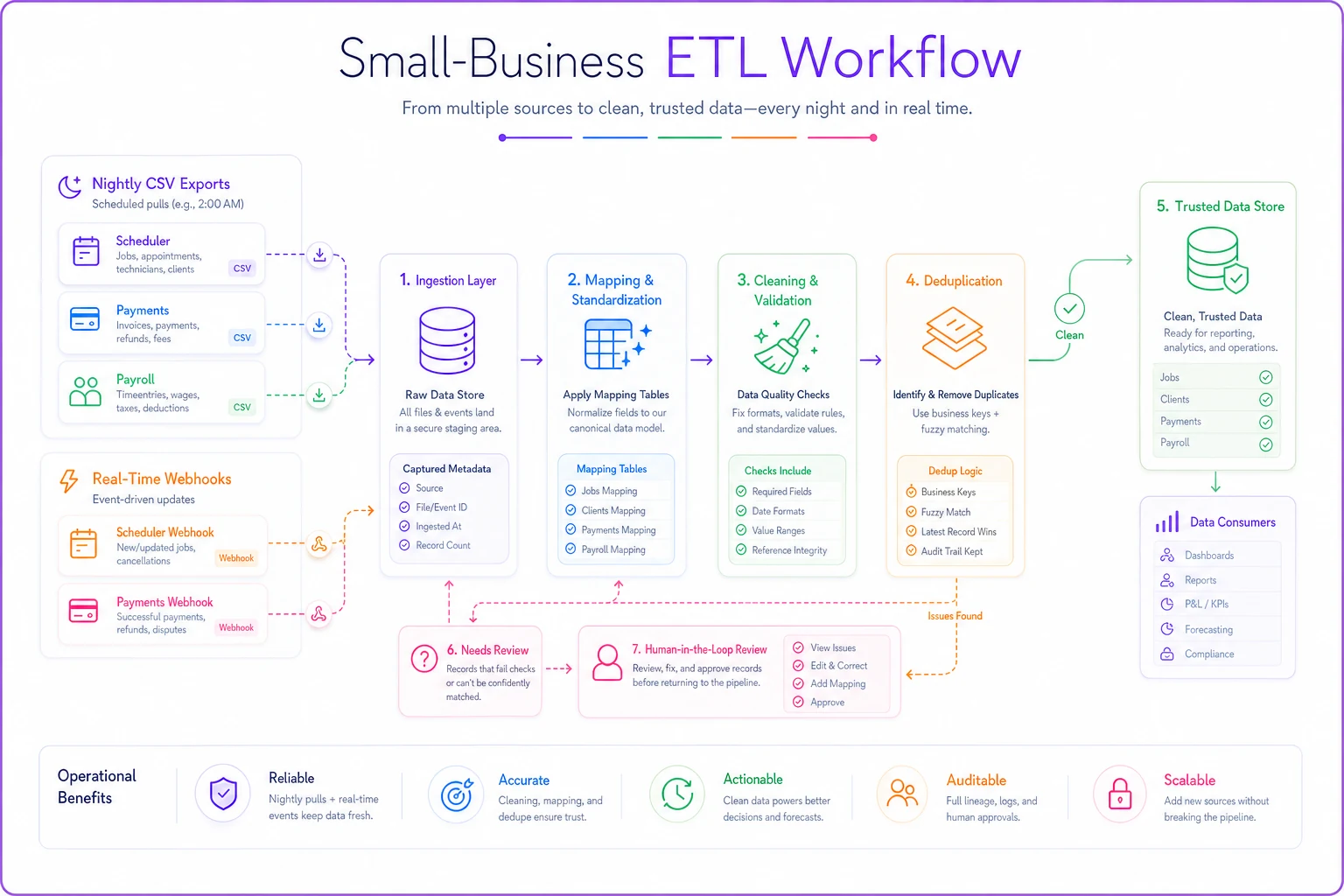
ETL sounds intimidating — extract, transform, load. For a small cleaner it's really just: get the data out, clean it up, put it somewhere central. You have two patterns to pick from, and you'll probably use both.
Pattern 1 — Scheduled CSV pulls (start here).
-
Tool emails a nightly CSV to a dedicated inbox
-
A script or automation picks it up
-
Field names get remapped per your mapping table
-
Values get cleaned (dates standardized,
$stripped, service types matched) -
Rows get deduplicated on
job_id -
Clean rows append to the central store
Pattern 2 — Webhooks (add when volume grows).
A typical payment webhook payload looks roughly like:
{ "event": "payment.completed", "paymentid": "pay8842", "amount": 189.00, "job_ref": "APPT-5567", "method": "card", "created": "2026-03-14" }
Your job is to catch that, map jobref to your canonical jobid, confirm amount matches the quoted price, and flag it if it doesn't. That single check — payment received vs. price quoted — catches underbilling that otherwise disappears silently.
Honest rule of thumb: start with CSVs, graduate individual events to webhooks only when the delay actually costs you money. Deep cleans that need same-day invoicing? Webhook. Monthly churn analysis? A weekly CSV is completely fine. Over-engineering this early is the most common way owners stall the whole project.
Where this breaks — and how to keep it honest
Any integration layer that touches money and payroll needs guardrails, because a bad sync doesn't just show wrong numbers — it can double-pay a crew member or under-bill a client. A few failure points worth designing around from day one:
-
Duplicate records. The same job imported twice inflates revenue. Always dedupe on a stable ID, never on name + date.
-
Silent field changes. A vendor renames an export column and your mapping quietly drops data. Add a check that flags when an expected column goes missing.
-
Timezone and date drift. A job at 11 PM logged in UTC lands on the wrong day and throws off daily revenue. Standardize to your local date early.
-
Unmatched service types. Anything that doesn't match your controlled list should go to a "needs review" bucket, not get silently discarded.
-
Reconciliation gaps. Once a week, someone eyeballs jobs completed vs. jobs paid. The mismatches are where your leaks live.
Because these flows touch billing and pay, keep a human in the loop on anything financial before it's treated as final. The principles in automation governance for small cleaners apply directly here — checkpoints, review buckets, and a rollback plan matter far more once your systems start acting on the data automatically.
When this makes sense — and when it doesn't
This isn't for everyone, and pretending otherwise wastes your time.
When it makes sense: you've got more than roughly 25 active clients, three or more tools holding pieces of your operation, and you've already caught at least one real billing or payroll error from data falling through the cracks. If you're spending real hours each week copying numbers between apps, the payback is fast.
When it's a bad idea: you're a solo operator with 8 clients and one scheduling tool that already shows you payments and jobs together. You don't need a canonical model — you need to keep running the business. Building integration plumbing at that stage is procrastination dressed up as progress.
Who should not start with webhooks: anyone who hasn't first gotten clean CSV pulls working. Real-time data that's mapped wrong is just wrong faster. Nail the model and the mapping on a slow cadence, then speed it up.
A real scenario
A two-crew maid service running around 130 jobs a month was using a scheduler, Square, and a spreadsheet for payroll. Revenue "felt" like roughly $18k–$20k a month, but the bank rarely agreed, and the owner spent most of Sunday reconciling by hand.
When they built out a canonical model — five objects, three mapping tables, nightly CSV pulls into one central sheet — the first reconciliation surfaced the problem immediately: somewhere between 6–8 completed jobs a month were never getting invoiced, mostly add-ons and last-minute deep cleans that lived only in text threads. That was north of $1,000 a month walking out the door, unnoticed.
Fixing the leak didn't require a new platform. It just took one place where job completed and payment received sat side by side, so the gap was visible. Sunday reconciliation dropped from a few hours to about twenty minutes, and the owner finally trusted a single revenue number.
The 90-day rollout checklist
You don't do this all at once. Spread it across three months so the business keeps running.
Days 1–30 — Model and map
-
Write your five canonical objects and their key fields
-
Pick one stable ID scheme for each object
-
Draft canonicalization rules for revenue, active client, margin, service type
-
Build a mapping table for your scheduler and your payment tool
-
Pick your central store (a well-structured sheet is fine to start)
Days 31–60 — Connect the core
-
Set up nightly CSV pulls for jobs and payments
-
Run the mapping + cleaning steps; dedupe on stable IDs
-
Build a "needs review" bucket for unmatched records
-
Do your first weekly reconciliation (jobs completed vs. paid)
-
Fix the first leaks you find — this is where it pays for itself
Days 61–90 — Extend and harden
-
Add payroll/time-tracking into the model for real job margin
-
Move one or two high-value events (payments) to webhooks
-
Add column-missing and unmatched-type alerts
-
Document each mapping table so it's not trapped in your head
-
Set a standing weekly reconciliation habit for whoever runs ops
You don't do this all at once. Spread it across three months so the business keeps running.
The point isn't the tech
The goal here was never a slick data pipeline. It's being able to answer, in ten seconds and with confidence, what your business actually did last month — and to catch the jobs, invoices, and hours that fall between tools before they cost you.
You get there by deciding what your business is in data terms, forcing every tool to translate into that shared language, and moving the data on the simplest cadence that keeps you honest. Start slow, with CSVs and a spreadsheet. Speed up only where the delay costs money. Keep a human checking anything that touches billing or pay.
Do that over 90 days and you've built something most small cleaning businesses never manage: a single source of truth you actually trust, assembled from tools you already own, at a price that makes sense for a company your size.
The goal here was never a slick data pipeline. It's being able to answer, in ten seconds and with confidence, what your business actually did last month — and to catch the jobs, invoices, and hours that fall between tools before they cost you.
You get there by deciding what your business is in data terms, forcing every tool to translate into that shared language, and moving the data on the simplest cadence that keeps you honest. Start slow, with CSVs and a spreadsheet. Speed up only where the delay costs money. Keep a human checking anything that touches billing or pay.
Do that over 90 days and you've built something most small cleaning businesses never manage: a single source of truth you actually trust, assembled from tools you already own, at a price that makes sense for a company your size.
Ready to elevate your cleaning business?
Join 500+ cleaning services using Maidufy to save time, reduce scheduling errors, and deliver exceptional client satisfaction.