

Most cleaning companies don't fail at technology because they picked the "wrong" app. They fail because they bought six apps that don't talk to each other, signed contracts nobody reads, and let client data scatter across five different places with no clear owner. By the time an owner notices, the schedule lives in one system, invoices in another, crew hours in a spreadsheet, and reviews buried in whoever's inbox happened to catch them.
This is a systems problem, not a shopping problem. So instead of listing "the best tools for cleaners," this is a playbook for picking, connecting, and de-risking your tech so it holds up when you go from 40 jobs a week to 400. Cleaning business tech strategy really just means one thing in practice: decisions you make today about vendors and data that either compound in your favor or quietly cost you money for years.
The mistakes owners make before they ever pick a vendor
Almost every stalled tech setup traces back to a handful of early decisions. None of them feel like mistakes at the time.
-
Buying features, not workflows. Owners get demoed a slick scheduling calendar and sign up. Nobody asks how a booking becomes a route, becomes crew hours, becomes an invoice, becomes a review request. The individual features work. The chain between them doesn't.
-
Letting data ownership stay undefined. When your client list, photos, and job history live inside a vendor's platform with no export path, you don't own your business — you rent access to it.
-
Optimizing for the two-person stage. A tool that's "good enough" for a solo operator tends to break the moment you add a second crew and a dispatcher who needs real visibility.
-
Signing annual contracts to save 15%. That discount looks great until month four when the product doesn't fit and you're locked in for eight more.
-
No plan for when something breaks. Payment processor goes down on a Friday. SMS reminders silently stop sending. Nobody has a fallback because nobody thought failure was part of the plan.
The pattern underneath all of these: owners treat software as a purchase instead of a system they're responsible for operating. The purchase ends. The operating never does.
What actually breaks as you scale
At the solo or two-crew stage, disconnected tools are annoying but survivable. You can hold the gaps together with your own memory and a few late-night spreadsheet updates. The problem is that this manual glue doesn't scale linearly — it gets exponentially worse.
Never miss a cleaning appointment again.
Maidufy helps you book, confirm, and manage every cleaning service seamlessly.
- Centralized booking management
- Automated client reminders
- Optimized staff scheduling
No credit card required
Here's the progression most cleaning businesses go through: Stage 1 (1–2 crews): One person knows everything. Double bookings are rare because one brain holds the calendar. Data lives wherever, and it's fine. Stage 2 (3–6 crews): The owner becomes the integration layer. Every handoff between scheduling, dispatch, and billing passes through them. They're copying job details into invoices, texting crews addresses, and manually chasing photos for a disputed clean. This is where owners start working 60-hour weeks doing data entry disguised as management. Stage 3 (7+ crews): The manual glue fails. A crew shows up to a cancelled job, an invoice never goes out, a recurring client silently churns because their reminder didn't fire. Each miss is small. Collectively they bleed a few thousand dollars a month and quietly cap your growth.
The bottleneck isn't the number of jobs — it's the number of handoffs a human has to manage manually. A clean tech strategy is really a strategy for eliminating handoffs, not adding features.
The vendor-selection decision matrix
Feelings and demos lie. A scoring matrix forces you to weigh the things that actually matter six months in. Here's a version tuned for cleaning operations. Score each vendor 1–5 per criterion, then weight it.
| Criterion | Weight | What you're actually checking |
|---|---|---|
| Data export / ownership | 25% | Can you export clients, jobs, photos, and history in a usable format anytime, without begging support? |
| Workflow fit (booking→invoice) | 20% | Does one job flow end-to-end, or do you re-enter data between steps? |
| Integration options (API/Zapier/webhooks) | 15% | Can it connect to your payment, accounting, and comms tools? |
| Contract flexibility | 15% | Month-to-month available? What's the real cancellation cost? |
| Reliability / uptime + support response | 10% | What happens Friday at 4pm when it goes down? |
| Ease of crew adoption | 10% | Will a non-technical cleaner actually use it in the field? |
| Total cost at your NEXT stage | 5% | Price at 3x your current job volume, not today's |
Two criteria carry the most weight for a reason. Data ownership and workflow fit are nearly impossible to fix later. You can swap a mediocre reminder system in a weekend. You cannot easily extract three years of client history from a vendor who makes it deliberately hard.
A quick gut-check while scoring: if a salesperson dodges the "how do I export all my data" question, drop their reliability and ownership scores immediately. Evasiveness there is the single most predictive red flag.
Minimal viable integrations: connect these, ignore the rest
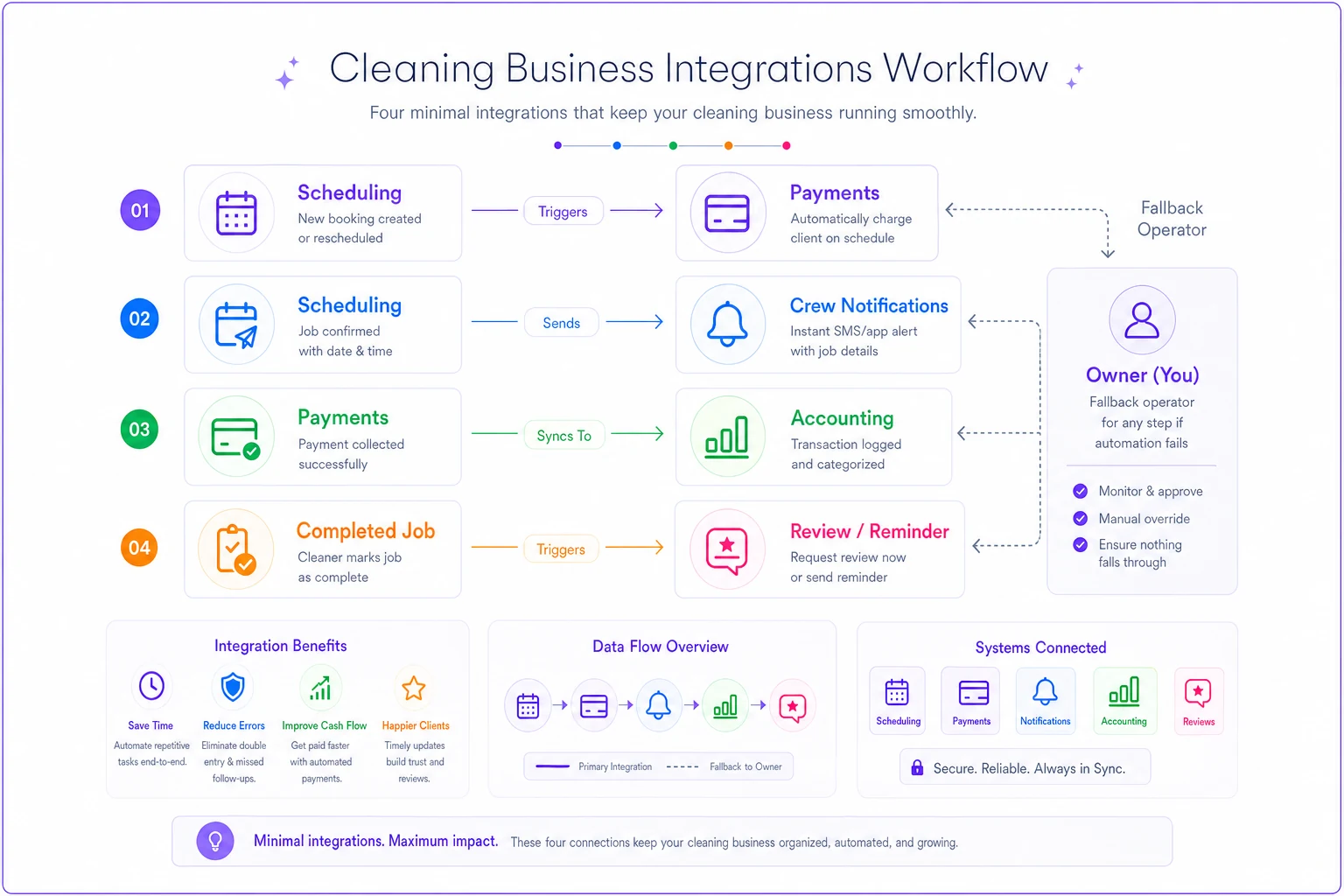
The urge to integrate everything is a trap. Every connection you build is something you have to maintain and something that can break. Start with the connections that remove the most manual handoffs, and leave the rest alone until you actually feel the pain.
-
Scheduling → Payments. A completed job should trigger an invoice without re-entry. This one connection kills the most common revenue leak: jobs that get done but never billed.
-
Scheduling → Crew notifications. Assignments, addresses, and changes push to crews automatically. No more owner-as-text-relay.
-
Payments → Accounting. Transactions flow into your books so reconciliation isn't a monthly nightmare.
-
Completed job → Review/reminder trigger. Finished cleans automatically start the retention sequence.
Four connections handle roughly 80% of the manual glue. Everything beyond — inventory, advanced reporting, marketing automation — is a later problem. If you're mapping out how these pieces should fit together without locking yourself to one vendor, the vendor-agnostic integration blueprint walks through the connective tissue in more depth.
A quick visual of these core connections:
On how you connect them: prefer native integrations first, then established connectors like Zapier or Make, then custom API work only if you truly must. Every step down that list adds fragility and maintenance cost.
Failure-mode playbooks: assume it will break
Your tools will fail — a processor outage, an API change, an accidental deletion, a vendor that hikes prices or shuts down. The businesses that stay stable aren't the ones with perfect software. They're the ones who decided ahead of time what to do when it breaks.
-
Payments go down. - Fallback
manual card entry or invoice-with-payment-link from a backup processor. - Who acts: office lead. - Client message: pre-written, ready to send.
-
Scheduling/dispatch is down. - Fallback
a shared read-only copy of today's and tomorrow's routes exported nightly (this is exactly why data export matters). - Who acts: dispatcher texts crews from the backup sheet.
-
SMS/email reminders stop firing. - Detection
this one's sneaky because there's no error — it just silently stops. You need an alert (see next section). - Fallback: manual reminder push for the next 48 hours of appointments.
-
Vendor shuts down or hikes price. - Because you scored data export at 25%, you can pull everything and migrate. The playbook is your export procedure plus a shortlist of the two runner-up vendors from your matrix.
The thing that separates stable operators from panicked ones: detection before fallback. A silent failure you catch in three days does more damage than a loud one you catch in three minutes.
Alerting and data-ownership rules
Two invisible things determine whether small failures stay small.
Alerting. Set up monitoring on the connections that move money or trigger client-facing actions. At minimum you want a signal when: an invoice doesn't generate after a completed job, a reminder batch fails to send, a payment sync to accounting breaks, or an integration errors out. You don't need enterprise monitoring — even a simple daily digest ("47 jobs completed, 47 invoices created ✓") catches the mismatches that quietly cost you.
Data-ownership rules. Write these down and treat them as non-negotiable:
-
You own an exportable copy of all client, job, and financial data — always. Schedule a monthly export to storage you control, regardless of how happy you are with the vendor.
-
One system is the source of truth for each data type. Clients live in one place. Jobs in one place. When two systems disagree, everyone knows which one wins. Ambiguity is where "which address is right?" chaos comes from.
-
Access is role-based and logged. Not everyone needs to see everything, and you should be able to answer "who changed this?"
-
When you offboard a vendor, you export first, cancel second. In that order. Every time.
Automate the monthly export to run to a storage account you control so it doesn't depend on someone's memory.
These rules are the practical foundation of a durable tech strategy, and they connect directly to how you store and use information over time — the data maturity guide for cleaning businesses goes deeper on storage patterns and the decision cadences that keep data useful instead of just accumulated.
A real scenario: the invisible billing leak
A residential cleaning company running around 320–350 jobs a month had scheduling in one platform and invoicing done manually by the office. The owner assumed everything got billed — crews marked jobs complete, so surely the invoices went out.
They didn't. Consistently. Rushed weeks, last-minute reschedules, and a handful of jobs the office simply forgot meant roughly 3–5% of completed cleans were never invoiced. At an average ticket around $140, that was somewhere in the range of $1,500–$2,400 a month walking out the door. Nobody stealing anything, just handoffs quietly failing.
The fix wasn't a fancier tool. It was one integration (completed job auto-generates a draft invoice) plus one alert (a daily count comparing completed jobs to invoices created). Within the first full month, the mismatch showed up as a "6 jobs completed, 4 invoices" flag on a Tuesday, the office caught it same-day, and the leak effectively closed. No new software category. Just connecting two things that were already there and watching the seam between them.
The 90-day phased migration checklist
If you're fixing a tangled stack, don't rip everything out at once. Mid-migration chaos has killed more cleaning ops than bad software ever did. Phase it.
Days 1–30: Map and stabilize (change nothing yet)
-
[ ] Write down every tool you pay for and what job it actually does.
-
[ ] Identify the source of truth for clients, jobs, and money.
-
[ ] Export a full copy of all data to storage you control.
-
[ ] Document current handoffs — where does a human re-enter data?
-
[ ] Score your current and candidate vendors on the decision matrix.
Days 31–60: Connect the core
-
[ ] Set up the four minimal viable integrations, one at a time.
-
[ ] Test each connection with real jobs before trusting it.
-
[ ] Add alerting on the money-moving and client-facing connections.
-
[ ] Write failure-mode playbooks for your two most critical systems.
Days 61–90: Migrate what needs migrating
-
[ ] If replacing a vendor
run old and new in parallel for 2–3 weeks.
-
[ ] Move recurring clients last, and in small batches.
-
[ ] Confirm every recurring booking, reminder, and billing rule carried over.
-
[ ] Export from the old vendor, verify it, then cancel.
-
[ ] Do a final data-ownership audit
is your monthly export actually running?
The overlap in the last phase — running old and new side by side — is the step owners skip to save money, and it's the one that saves them from a migration disaster. A few weeks of double-paying is far cheaper than a week of missed jobs and confused clients.
When to leave your stack alone
Not every messy setup needs fixing right now. If you're a solo operator or running one crew and can hold the whole operation in your head without missing things, adding integrations may create more overhead than they remove. Manual glue is genuinely cheaper than maintenance at that scale.
Rebuild your stack when you notice the warning signs: you're personally the handoff between two tools, jobs are slipping through un-billed, crews are getting information late, or you're afraid to take a week off because the whole thing runs on your memory. Those are the real signals that you've outgrown manual glue — not a number on a dashboard, but the feeling that the business only works when you're constantly patching the seams.
And a caution on the opposite mistake: don't over-engineer. If you're building custom API integrations for a five-crew operation, you've probably added fragility you don't have the time to maintain. Match the complexity of your stack to the complexity of your operation, not to what looks impressive.
The bigger point
A cleaning business tech strategy isn't about having the newest tools. It's about owning your data, minimizing manual handoffs, and deciding in advance what happens when something breaks. Do those three things and your stack becomes something you operate on your terms — one that scales with you instead of quietly capping your growth.
The tools will keep changing. Vendors will come and go. What protects you across all of it is the discipline underneath: clear data ownership, deliberate integrations, and playbooks for the days things go sideways. Get that foundation right, and switching a tool later becomes a weekend project instead of an existential threat.
A cleaning business tech strategy isn't about having the newest tools. It's about owning your data, minimizing manual handoffs, and deciding in advance what happens when something breaks. Do those three things and your stack becomes something you operate on your terms — one that scales with you instead of quietly capping your growth.
The tools will keep changing. Vendors will come and go. What protects you across all of it is the discipline underneath: clear data ownership, deliberate integrations, and playbooks for the days things go sideways. Get that foundation right, and switching a tool later becomes a weekend project instead of an existential threat.
Ready to elevate your cleaning business?
Join 500+ cleaning services using Maidufy to save time, reduce scheduling errors, and deliver exceptional client satisfaction.