

Most cleaning services pour energy into finding new customers while past clients quietly hire competitors. You've probably seen this play out: strong first clean, decent follow-up for a few weeks, then silence. Six months later that client is on someone else's route.
The cleaning service customer lifecycle isn't just about getting bookings — it's about knowing when clients are most likely to leave and building systems before that happens. Businesses that treat customer relationships as distinct stages retain somewhere around 40% more clients than those who just wing it.
The lifecycle stages nobody teaches you
There are seven phases in a cleaning service customer lifecycle, each with different needs and different risks. Miss the signals in any one of them and you're losing revenue you already earned.
Acquisition is when someone first finds you. They're comparing three, maybe four services, reading reviews, getting quotes. At this point they care about trust more than price. Real photos of your actual team, fast response times, specific service details — these win more than some generic "we clean homes" pitch.
Onboarding starts at first contact and runs through that initial clean. This window sets the tone for everything. Most services blow it by treating it like a transaction. The client needs to know exactly what's coming — who shows up, what products you use, how they can give feedback.
Activation is that moment after the first clean when they decide whether to book again. This is where most businesses completely drop the ball — they wait for the client to reach out. A client who hasn't booked their second clean within 10 days has roughly an 85% chance of never coming back.
Recurring service is when they've settled into a schedule. But "regular" doesn't mean "safe." Complacency kills retention here. The excitement wears off, small issues stack up, and suddenly a competitor's Facebook ad looks appealing.
At-risk status kicks in when behaviors shift. Skipped cleans, slower responses, complaints about things that never bothered them before. Most services don't track these signals, so cancellation comes as a surprise. By the time a client is explicitly complaining, you've usually already lost them.
Churned means they've stopped. But churned doesn't mean gone forever. The first 30 days after cancellation is your best shot at winning them back. After 90 days, reactivation rates drop by around 70%.
Reactivation works when you understand why they left. Maybe they moved. Maybe their finances changed. Maybe they tried a cheaper service and remembered why they liked yours.
KPIs that predict problems before they explode
Generic metrics like "monthly revenue" or "total clients" hide what's actually happening inside your business. You need stage-specific numbers.
Never miss a cleaning appointment again.
Maidufy helps you book, confirm, and manage every cleaning service seamlessly.
- Centralized booking management
- Automated client reminders
- Optimized staff scheduling
No credit card required
During acquisition, track quote-to-booking conversion by source. If your website converts at 12% but Facebook leads convert at 4%, you're wasting ad spend. Watch response time too — every hour of delay drops conversion by roughly 15%.
For onboarding, watch first-clean completion rate and immediate rebooking percentage. If more than 10% of first cleans don't happen (client cancels, nobody home, wrong address), your pre-clean communication needs work. If under 60% book a second clean right after the first, there's a gap somewhere in delivery or follow-up.
Activation comes down to the second and third clean. Measure the percentage who complete three cleans within 45 days — that's your stickiness number. Clients who make it to three cleans typically stick around for 8 months or more. Also track upsells during this phase; clients who add services tend to have meaningfully higher lifetime value.
For recurring clients, watch frequency changes and communication patterns. A client moving from weekly to biweekly isn't just adjusting their schedule — they're testing whether they actually need you. Response times slowing from same-day to several days is a warning sign.
At-risk indicators worth monitoring consistently:
-
Skipped their regular cleaning twice in 60 days
-
Complained about quality on the last two visits
-
Communication response time dropped significantly
-
Asked about pricing or mentioned a competitor
-
Switched from recurring to on-demand
Churn analysis needs to be specific. "Too expensive" could mean they found cheaper service, their budget changed, or they didn't feel the value matched the price. Each reason calls for a different reactivation approach.
The trigger map that catches problems early
A trigger-based system means specific actions tied to specific behaviors. Not blasting clients with messages — relevant, timely outreach when it actually matters.
| Lifecycle Stage | Trigger Event | Response Action | Timeline |
|---|---|---|---|
| Acquisition | Quote requested | Send detailed estimate with team photos | Within 2 hours |
| Acquisition | No response to quote | Follow-up with scheduling link | 24 hours later |
| Onboarding | First clean booked | Send prep checklist and cleaner profiles | Immediately |
| Onboarding | Day before first clean | Confirmation text with arrival window | Morning of day before |
| Activation | First clean completed | Quality check call and booking link | Within 24 hours |
| Activation | No second booking | Offer scheduling assistance | Day 5 |
| Recurring | Skipped regular clean | Check-in message (not sales) | Same day |
| Recurring | Two skips in 60 days | Manager call about service fit | Within 48 hours |
| At-risk | Quality complaint | Supervisor inspection offer | Same day |
| At-risk | Price objection | Value review conversation | Within 24 hours |
| Churned | Cancellation | Exit interview request | Day 2 |
| Churned | 30 days since cancel | Winback offer based on exit reason | Day 30 |
| Reactivation | Opened winback email | Personal follow-up call | Within 4 hours |
Here's a simple visual of the trigger workflow.
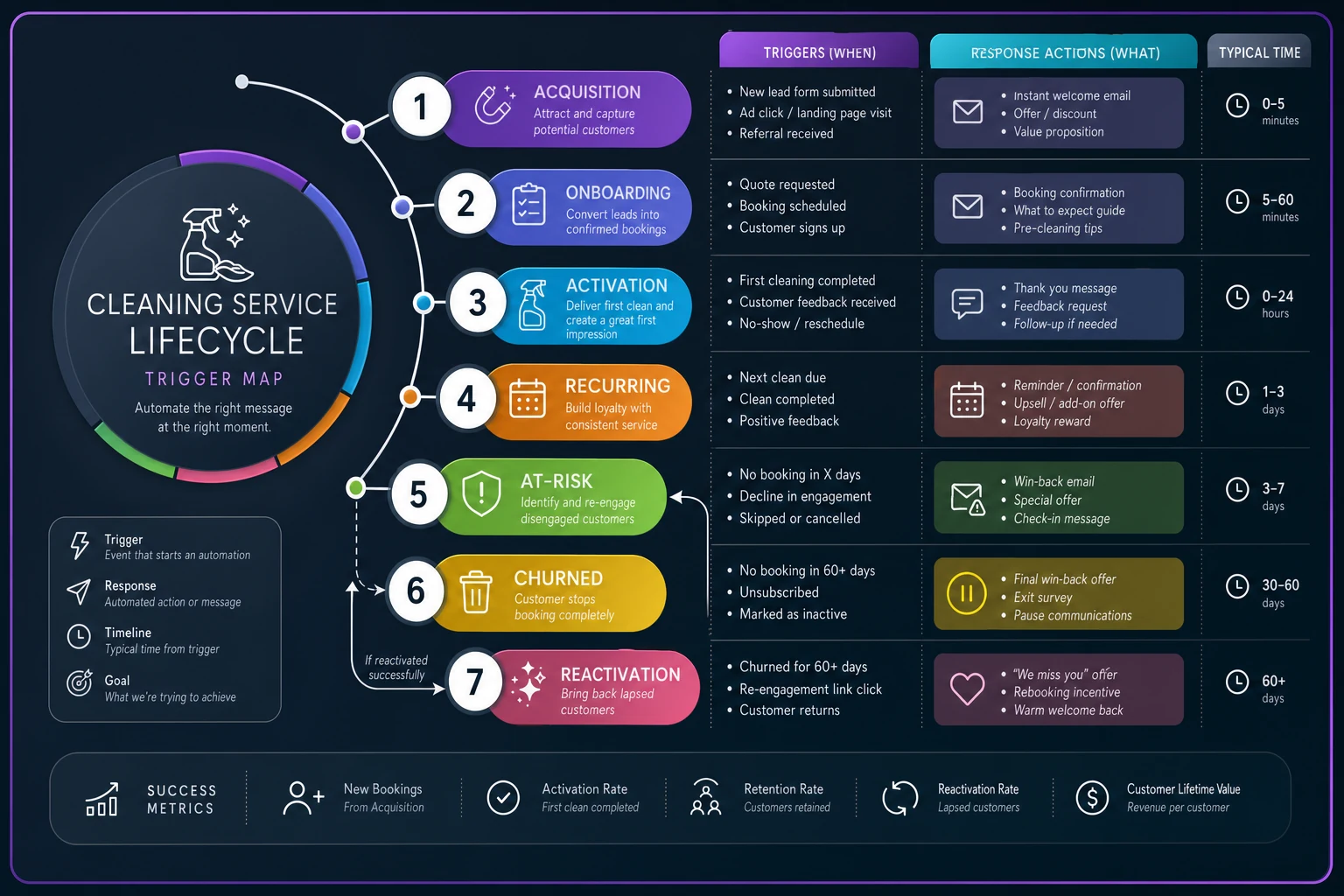
Timing is everything here. A trigger that fires three days late might as well not fire at all. Manual tracking fails because by the time someone notices the pattern, the client is already gone.
Manager routines that actually move retention
Daily, weekly, and monthly review habits determine whether your lifecycle system actually works or just exists in a document nobody reads. Most cleaning businesses have no structured management review beyond checking deposits.
Daily routines should take 15 minutes or less. Check all yesterday's first cleans for rebooking. Review today's at-risk client cleans for quality issues. Scan overnight quotes.
Your operations manager — or you, if you're still running solo — needs a simple daily dashboard showing:
-
First cleans with no follow-up booking
-
Skipped cleans in the past 48 hours
-
Client messages unanswered over 4 hours
-
Quality complaints from yesterday
Weekly routines are about pattern recognition. Every Monday, pull clients who skipped in the past week and look for clusters — geographic, by service type, by timing. End-of-month cancellations often signal budget pressure. Mid-week skips from the same neighborhood might be a cleaner issue.
Pull your at-risk list and stack rank by lifetime value. A weekly client of 18 months deserves more energy than a monthly client who started last month. Be honest about where your attention goes.
Monthly routines track lifecycle flow rates. What percentage moved from acquisition to onboarding? Onboarding to activation? Recurring to churned? Compare month-over-month and year-over-year.
The monthly review surfaces things daily checks miss. Maybe activation dropped 10% after you changed your intake form. Maybe churn spiked after you raised prices but only for biweekly clients. You won't see it unless you're looking.
Keep the daily routine under 15 minutes with a concise dashboard that highlights only rebooking, skips, unanswered messages, and complaints.
Track a monthly "save rate" — at-risk clients identified versus those who actually churned. If you're flagging 50 and 45 still leave, your interventions aren't landing. If only 5 are flagged but 20 churn, your triggers need recalibrating.
Prioritized interventions based on client value
Not every client deserves the same save effort. Harsh but realistic. Your resources — time, discounts, management attention — should go where the revenue impact is highest.
A rough lifetime value calculation: (monthly revenue × average retention months) − acquisition cost. A weekly client at $140/clean with 12-month average retention is around $7,200 LTV. A monthly client at $180 with 6-month retention is roughly $1,080. When they both complain on the same day, you know who gets the manager's personal call.
High-value intervention triggers warrant immediate management attention:
-
Weekly or biweekly clients over 6 months tenure
-
Any client over $500/month
-
Clients who've referred others
-
Commercial accounts regardless of size
These clients get same-day responses, monthly proactive check-ins, and flexibility on scheduling or pricing. When they're at risk, the owner or a senior manager handles it personally.
Medium-value interventions follow structured processes:
-
Monthly clients with 3+ cleans completed
-
Biweekly clients under 6 months
-
Previously churned clients who came back
These get 24-hour response times, quarterly check-ins, and standard retention offers. Experienced staff handle outreach using proven templates with clear escalation paths.
Low-value interventions use automated or batch processes:
-
One-time deep clean clients
-
Monthly clients under 3 cleans
-
Consistently difficult clients regardless of revenue
These get automated email sequences, standard reminder schedules, and basic retention offers. Don't ignore them entirely — today's occasional client can become a weekly regular — but don't burn resources chasing poor-fit clients.
Winback campaigns that actually work
Most cleaning services write off churned clients forever. But those same clients are roughly 3x easier to convert than cold prospects. They already know your quality, have you saved in their phone, and trusted you enough to let you into their home.
Timing matters more than offer quality. Within the first 30 days after churn, you have roughly a 20% success rate with the right approach. Days 31-90 drops to around 8%. After 90 days you're below 3% unless something significant changed in their situation.
Segment winback campaigns by churn reason:
Price-driven churn needs value reinforcement, not just a discount. "We know budget matters. Here's what's included that others charge extra for..." — supplies, insurance, background checks, quality guarantees. Then offer a graduated return: first clean at the old price, 10% off the second if booked same day.
Quality-driven churn requires specific improvement evidence, not vague reassurance. "Since your feedback about baseboards, we've added photo verification for every clean. Here's what changed..." Include actual before/after photos. Offer a satisfaction-guaranteed return clean with the owner reviewing results.
Life-change churn — moves, new baby, job change — needs patience and different timing. Check in at 3 months, 6 months, a year. "Hi Sarah, it's been 6 months since your move. If you're settled in and ready for regular cleaning again, we've kept your preferences on file."
Competitor churn often resolves on its own after a bad experience with the other service. You can speed that up: "Hope your new service is working well. If anything changes, we've kept your preferences on file and have immediate availability." No pressure, no pitch.
Track winback performance carefully. Which messages work? Which timing? Which offers? A 2% improvement in winback rate could mean $30k+ in annual revenue for a mid-size operation.
Sample automation rules that prevent revenue leaks
Manual lifecycle management starts breaking down somewhere around 50 active clients. You can't hold all of that in your head. Operational software with basic automation rules is what keeps your retention rate from quietly bleeding out.
First clean automation sequence:
-
T-minus 24 hours
"Hi [Name], excited for your first clean tomorrow! Your team (Maria and Jennifer) will arrive between 9-11am. Please secure any valuables and let us know about any special instructions."
-
T-plus 2 hours
"How did your first clean go? Quick feedback helps us improve: [feedback link]"
-
T-plus 24 hours
"Thanks for trusting us with your home! Ready to book your next clean? Most clients prefer recurring service for consistency: [booking link]"
-
T-plus 5 days (if no booking)
"[Name], noticed you haven't scheduled your next clean. Any questions I can answer? Reply with preferred dates and we'll handle the rest."
At-risk client automation:
-
Skip detected
"Hi [Name], noticed you skipped your regular Thursday clean. Everything okay? Reply 'reschedule' for next available slot or 'pause' if you need a break."
-
Second skip in 60 days
Escalation to manager for personal call
-
Quality complaint logged
Manager notification within 1 hour, client response within 4 hours
-
Price inquiry detected
Send value comparison sheet, schedule manager call
Reactivation automation:
-
Day 30 post-churn
Personalized winback email based on churn reason
-
Day 45 (if email opened but no response)
SMS follow-up with limited-time offer
-
Day 60
Final attempt with a different angle
-
Day 90
Move to quarterly newsletter list only
These automations catch a large portion of retention opportunities. The rest need human judgment — the client whose parent is in the hospital, the one whose house is mid-renovation, the one who had a bad experience with one specific cleaner.
SLA-backed handoffs between teams
Clear service level agreements between your teams prevent clients from slipping through the cracks during transitions. Every handoff needs defined ownership, a timeline, and an escalation path.
Sales to Operations handoff:
-
Sales completes intake form with access info, preferences, pet details
-
Operations confirms receipt within 2 hours
-
Operations assigns team and sends client introduction within 24 hours
-
If operations identifies issues (area not served, dates unavailable), back to sales within 4 hours
Operations to Quality Assurance handoff:
-
Every 5th clean triggers a QA review
-
At-risk clients trigger immediate QA review
-
QA completes inspection within one clean cycle
-
Results communicated to client within 24 hours of inspection
Customer Service to Management handoff:
-
Complaints escalate if
second complaint in 30 days, client threatens cancellation, client requests refund
-
Manager responds within 4 hours during business hours
-
Resolution or update to client within 24 hours
-
If unresolved after 48 hours, escalates to owner
Cleaning Team to Operations handoff:
-
Team reports issues same day (access problems, damage, client complaints)
-
Operations responds to client within 4 hours
-
Scheduling changes handled within 24 hours
-
Pattern issues (same client, repeated problems) escalate to management review
Without these agreements in place, clients feel the chaos. They complain to one person, get passed to another, wait days for answers, and eventually cancel just out of frustration.
The compound effect of lifecycle optimization
A 5% improvement at each stage compounds into significant revenue growth. Say you get 100 leads monthly. Currently 20% book (20 clients), 60% activate (12 clients), and you retain them 6 months at $400/month. That's around $28,800 in monthly recurring revenue after 6 months.
Improve each stage by just 5%: 25% book (25 clients), 65% activate (16 clients), retained for 7 months. Now you're closer to $44,800 monthly recurring. Around 55% revenue growth from changes that individually seem minor.
The real question is which stage to focus on first. If acquisition is already strong but activation is weak, fixing activation gets you more than obsessing over lead generation. Most services do the opposite — spend more on ads while quietly losing clients a few months in.
Building your lifecycle system without overwhelming your team
Start with the highest-impact, lowest-effort improvement. Usually that's the 24-hour post-first-clean follow-up. That one touchpoint alone can move activation rates by 15-20%.
Next, set up basic at-risk triggers. You don't need expensive software for this — a spreadsheet tracking last clean date and flagging anyone past 45 days works fine. Check it weekly. Call the flagged clients.
Then add lifecycle stage tags to your existing system. Label each client: acquisition, onboarding, activated, recurring, at-risk, or churned. Update weekly during reviews. Patterns will show up quickly.
Only after the basics are working consistently should you add automation layers. Buying software before you understand what triggers matter for your specific clients is a waste of money and usually causes more confusion than it solves.
Why most lifecycle systems fail (and how to avoid it)
The biggest failure is treating lifecycle management as a marketing function. Marketing might own acquisition, but operations owns everything after that. When nobody owns the full lifecycle, gaps appear everywhere and nobody feels responsible for fixing them.
Second failure: overcomplicating things before the basics work. You don't need 47 email sequences before you've figured out how to consistently follow up after first cleans.
Third failure: tracking everything but analyzing nothing. Most services are sitting on decent data they never actually review. Weekly lifecycle metrics should be as non-negotiable as checking bank balances.
Fourth failure: one-size-fits-all intervention. Your two-year weekly client and last month's one-time deep clean need completely different approaches. Treating them the same wastes resources and irritates the wrong people.
Turning your client list into predictable revenue
Every client follows these lifecycle stages whether you manage them or not. The services that do manage them see the results in retention rates, lifetime value, and marketing ROI that actually makes sense because they're not filling a leaky bucket.
The automation and systems aren't about replacing real relationships — they make sure human connection happens at the right moments. When your ops manager knows exactly which clients need attention today, they can have an actual conversation instead of scrambling to catch up on yesterday's problems.
Start with one stage. Activation or at-risk identification is usually the best entry point. Get it working consistently, then expand. Within six months you'll have a full lifecycle system that converts one-time cleans into long-term recurring revenue.
Your past client list isn't dead opportunity. It's dormant revenue waiting for the right trigger.
Ready to elevate your cleaning business?
Join 500+ cleaning services using Maidufy to save time, reduce scheduling errors, and deliver exceptional client satisfaction.