


A client who flips from weekly to monthly cleaning doesn't just change a line item in your calendar. They pull a thread. The crew that was "full" on Thursdays suddenly has a 90-minute hole. The route that made geographic sense last month now has your team driving past three empty slots to reach one. And the invoice? Half the time it goes out wrong because nobody decided whether the change applied mid-cycle or next cycle.
Most cleaning operations handle frequency changes reactively — one text at a time, one exception at a time. That works until you have enough recurring clients that the churn starts eating your margins through drive time, idle crew hours, and billing disputes you don't catch until the client calls confused. It's a decision-rules problem, and it's solvable with a real frequency change SOP cleaning teams can actually follow without a manager approving every single request.
The core decision: immediate vs queued
Every frequency change falls into one of two buckets, and the whole SOP hinges on sorting them correctly.
An immediate change takes effect right away — the next scheduled visit reflects the new frequency. A queued change takes effect at the start of the next billing cycle or scheduling block. The instinct of most owners is to just do what the client wants, when they want it. That instinct is exactly what shreds your routes.
| Change type | Default to IMMEDIATE when… | Default to QUEUED when… |
|---|---|---|
| Increasing frequency (e.g. monthly → weekly) | You have open capacity on the target day/route | Target day is full; slot needs to be built into next cycle |
| Decreasing frequency (e.g. weekly → bi-weekly) | Change is 7+ days out and crew can be reassigned | Next visit is <72 hours away (crew already routed/committed) |
| Pausing entirely | Medical, travel, or hardship reasons | Seasonal or vague "we'll see" requests |
| Switching cleaning day | New day has existing route density nearby | New day would create an isolated stop |
The table isn't a law — it's a starting posture. The real skill is in the gates that override it.
Acceptance gates: what has to be true before a change goes live
An acceptance gate is a yes/no checkpoint. If any gate fails, the change doesn't auto-process — it gets queued or kicked to a human. The point is to let maybe 80% of frequency changes flow through automatically while catching the ones that would wreck a route or a crew's day.
Never miss a cleaning appointment again.
Maidufy helps you book, confirm, and manage every cleaning service seamlessly.
- Centralized booking management
- Automated client reminders
- Optimized staff scheduling
No credit card required
-
Notice gate. Is the request more than 72 hours before the next affected visit? If no → queue it. You've already committed crew and fuel for anything inside that window, and changing it last-minute creates the exact idle time you're trying to avoid.
-
Capacity gate. For frequency increases, does the target day/route have an open slot within roughly 15 minutes of an existing stop? If no → queue until you can build density. Don't force a lonely stop that costs 40 minutes of round-trip driving.
-
Route-integrity gate. Does accepting this change leave a crew with a gap longer than one average job on that day? If yes → flag it. A single hole isn't a crisis; three holes across a week means a route needs rebuilding, not patching.
-
Billing-clarity gate. Can the pro-rata be calculated cleanly from the change date? If the client prepaid a package or sits on a plan with bundled visits, a human needs to confirm the credit math before anything goes live.
The mistake most operations make is keeping these gates informal — living in a manager's head. The manager "just knows" that Tuesdays in the north zone are full. Then the manager takes a week off, a coordinator approves a change, and suddenly a crew is driving 22 minutes for one house. Writing the gates down is what turns a tribal rule into something the whole team enforces the same way every time.
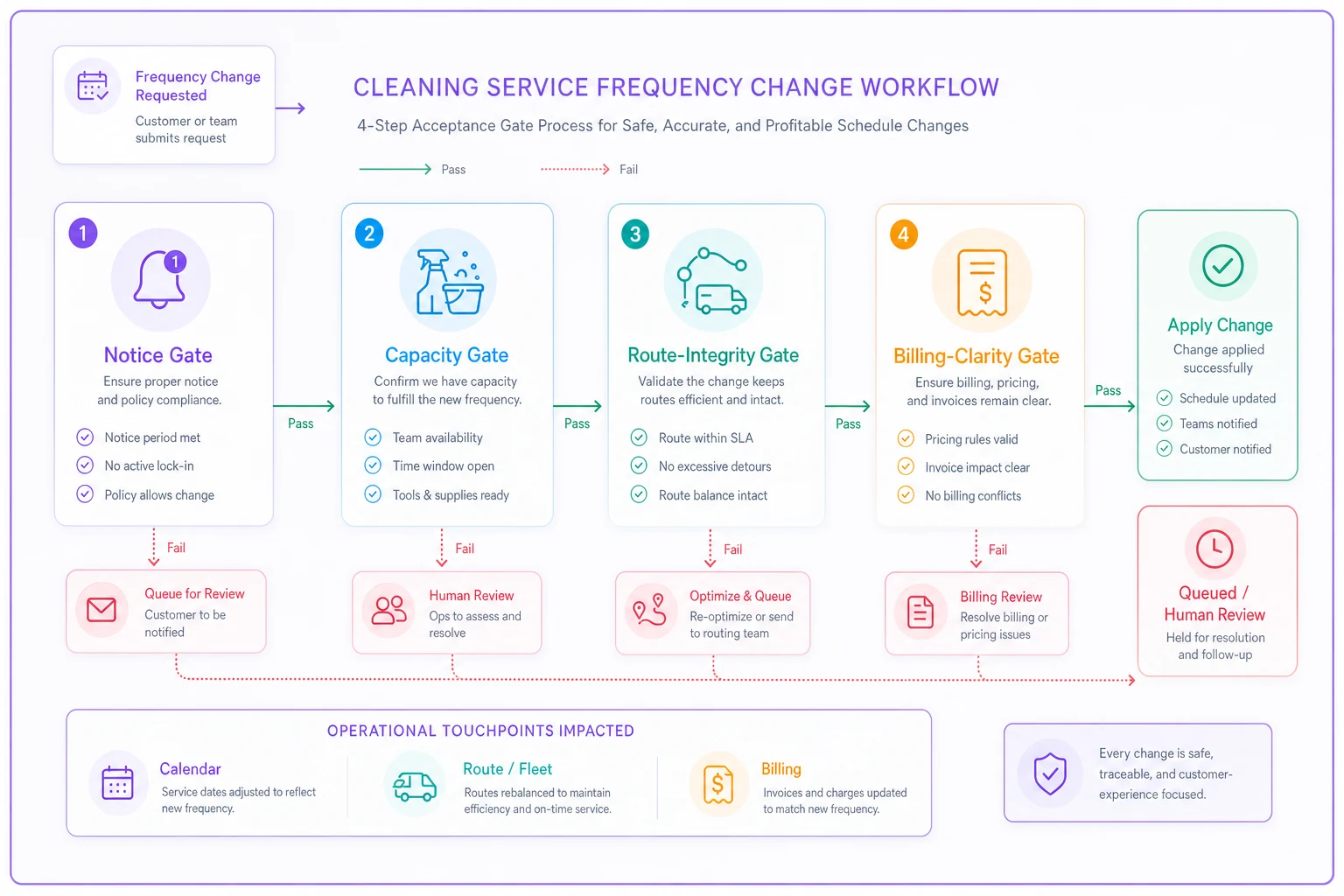
A simple flow like this helps coordinators run the four gates in order without guessing.
Pro-rata billing: the part everyone gets wrong
Frequency changes mid-cycle create partial periods, and partial periods create math that your team will fudge if you don't give them worked examples. Clients notice billing errors faster than almost anything else, and a wrong invoice after a frequency change undermines the goodwill the flexibility was supposed to build.
Example 1 — Upgrade mid-cycle (bi-weekly → weekly). A client on bi-weekly at $140/visit upgrades to weekly, effective immediately, 10 days into a 30-day billing cycle. They'd already had one bi-weekly visit this cycle. For the remaining 20 days at weekly, they'll now get roughly 3 extra visits versus what the cycle was priced for. Bill the added visits at the weekly rate — in this case 3 × $125 (the weekly per-visit rate, since weekly is usually discounted) = $375 added to the current invoice, with the new baseline starting next cycle. Upgrades get billed per added visit, not by re-rating the whole month.
Example 2 — Downgrade mid-cycle (weekly → monthly). A weekly client at $125/visit prepaid the full 30-day cycle ($500 for 4 visits). They downgrade to monthly after 2 visits. They've consumed $250 of service. Monthly going forward means a single visit per cycle. You owe them a credit for the 2 unused weekly visits — but here's where most people get tripped up: those unused visits were priced at the weekly discount rate. If they're dropping to monthly, the fair credit is the unused prepaid amount ($250), carried as account credit rather than a cash refund. Refund only on request; default to credit to keep the relationship (and cash) intact.
Example 3 — Pause with a protected slot. A client pauses for 6 weeks (travel). If you want to hold their Thursday 10am slot, that slot has a cost — it's capacity you can't sell. A fair policy: hold the slot free for up to 2 weeks, then either release it or charge a small hold fee (say $20–25 per skipped visit) if they want it guaranteed on return. No pro-rata owed for a pause since nothing was rendered, but the slot-hold decision is where money quietly leaks.
The pattern across all three: upgrades bill per-visit, downgrades credit the unused prepaid amount, and pauses are about slot cost, not service cost. Write those three rules down and most of your frequency-change invoices stop being guesswork.
Routing heuristics that minimize churn
Changing a frequency is cheap. Re-routing around it is where the real cost hides. The goal of your routing heuristics is to absorb frequency changes with the fewest route alterations possible.
-
Anchor density before you fill edges. When an upgrade opens a new recurring slot, place it next to your densest existing cluster on that day — not wherever the client prefers. Preference is negotiable; drive time isn't. Offer a 2-hour window that fits your route rather than an exact time that doesn't.
-
Batch downgrades into route-rebuild days. Don't re-route every time a client drops frequency. Let the gaps accumulate and rebuild the affected route once a week on a set day. A single planned rebuild beats five reactive patches, and it keeps crews on predictable rhythms.
-
Protect the recurring backbone. Recurring slots are the skeleton of every route. One-offs and newly upgraded frequencies should flex around them, not the reverse. There's more on keeping that structure intact in mixing one-offs with protected recurring slots — the same logic applies the moment a frequency change threatens a protected slot.
-
Use the 15-minute rule. If a frequency change would create a stop more than 15 minutes from the nearest same-day job, queue it rather than accept it immediately. That buffer is roughly where added drive time starts canceling out the job's margin on a standard residential visit.
Offer a 2-hour window that fits your route rather than an exact time that doesn't.
The non-obvious part: route churn is usually self-inflicted. It comes from accepting changes immediately when queuing them one cycle would have allowed a clean batch adjustment. Patience on when a change takes effect is the cheapest route-optimization tool you have.
A realistic walkthrough
A two-crew residential operation running around 180 recurring clients was processing frequency changes entirely by text and gut feel — roughly 15–20 changes a month, no written gates, coordinator approving almost everything immediately because it felt like good service.
The symptoms: crews averaging an extra 35–45 minutes of daily drive time from scattered stops, and 2–3 billing disputes a month tied to mis-prorated invoices after changes. A slow $2k–$3k monthly bleed between idle crew time, fuel, and the labor of fixing invoices.
They introduced the four acceptance gates and the three pro-rata examples as a one-page SOP. Nothing fancy — a laminated card at the coordinator desk and the rules baked into how changes got logged. Immediate changes dropped to maybe a third of requests; the rest got queued to the next cycle. Within two months, daily drive-time creep tightened back up noticeably, and billing disputes from frequency changes fell to roughly one every other month.
The change wasn't software or a new hire. It was removing the decision from the coordinator's gut and putting it into four gates anyone could run the same way.
Where this fits in your systems
A frequency-change SOP touches scheduling, routing, and billing simultaneously, which is why it tends to fall through the cracks — no single person owns all three. Operational platforms with scheduling and billing in one place help here, mostly by enforcing the gates automatically: flagging changes inside the 72-hour window, calculating the pro-rata from the change date instead of someone eyeballing it, and surfacing route gaps before a coordinator accepts a lonely stop. The value isn't automation for its own sake — it's that the gates get applied identically every time, even when your experienced coordinator is out.
That said, the SOP comes first. Software enforcing bad rules just breaks routes faster. Write the gates and the pro-rata examples down, run them manually for a few weeks until they feel right, then let a system carry the repetitive parts.
When to bend the rules
A clean SOP still needs judgment on the edges.
-
Bend toward immediate for genuine hardship — a client with a new baby or a medical situation. The goodwill is worth the route cost, and these are rare enough not to matter.
-
Bend toward queued, firmly, for serial changers — clients who flip frequency every few weeks. Put them on a "changes take effect next cycle only" policy. It protects your routes and gently discourages the churn.
-
Don't apply this to brand-new clients mid-onboarding. Their frequency often settles in the first month as they figure out what they actually need. Forcing gates too early feels rigid. Let the onboarding flow run first — the way you set expectations early shapes how often they change later, which is part of why a deliberate onboarding flow that turns new bookings into repeat clients reduces downstream frequency churn in the first place.
Frequency changes will never be zero, and they shouldn't be — flexibility is part of why clients stay. The goal isn't to eliminate changes. It's to make sure each one costs you a clean invoice and a single routing decision, not a cascade of empty slots and confused clients. Four gates, three billing examples, and a handful of routing heuristics get you most of the way there.
Frequency changes will never be zero, and they shouldn't be — flexibility is part of why clients stay. The goal isn't to eliminate changes. It's to make sure each one costs you a clean invoice and a single routing decision, not a cascade of empty slots and confused clients. Four gates, three billing examples, and a handful of routing heuristics get you most of the way there.
Ready to elevate your cleaning business?
Join 500+ cleaning services using Maidufy to save time, reduce scheduling errors, and deliver exceptional client satisfaction.