


Most cleaning owners treat ACH like a credit card charge that just takes a little longer. That assumption is exactly where the money leaks. A card settles in a day or two with a clear pass/fail. ACH and e-checks move on a batch schedule, can bounce days after they looked fine, and the return notice shows up when you've already paid your crew for the job tied to that payment.
This article is about one narrow thing: building a calendar that matches when ACH money actually lands versus when you release payroll — so a returned e-check doesn't quietly turn a profitable week into a negative one.
The specific failure: you got "paid" Tuesday, and the money vanished Friday
Here's the exact sequence that trips up cleaning businesses running recurring ACH on residential clients.
A recurring client is set to auto-debit $180 on the 1st. Your processor shows the payment as "completed" or "processing" the next morning. Your scheduling system marks the invoice paid. Payroll runs on the 5th, and the cleaner who did that job gets paid for it. Then on the 6th or 7th, an ACH return code comes back — R01 (insufficient funds) or R10 (customer disputes the debit). The $180 is yanked back out of your account, plus a return fee from your processor.
You've now paid wages, drive time, and supplies on a job that generated zero revenue. Multiply that across a route of 20–30 recurring ACH clients and a bad week of returns, and you're not looking at a rounding error.
The reason this keeps happening isn't carelessness. It's that "processing" and "settled" and "cleared" are three different states, and almost every cleaning software surfaces the first one as if it means the money is yours. It isn't — not until the return window has passed.
Why ACH timing is genuinely different (and why cards trained you wrong)
Running cards for years teaches owners a mental model that breaks down completely with ACH. With cards, a decline happens at the moment of sale. With ACH, the "decline" can arrive days later — and the two common delays have very different lengths.
Never miss a cleaning appointment again.
Maidufy helps you book, confirm, and manage every cleaning service seamlessly.
- Centralized booking management
- Automated client reminders
- Optimized staff scheduling
No credit card required
-
Administrative returns (R03 no account, R04 invalid account number) usually come back within 2 banking days.
-
Insufficient-funds returns (R01, R09) typically land within 2–3 banking days.
-
Unauthorized / dispute returns (R10, R07, R29) are the dangerous ones — the consumer has up to 60 calendar days to claim the debit wasn't authorized.
So a residential recurring client who autopays on the 1st could, in theory, dispute that debit well into the following month. That's the window that eats payroll if you're not reserving against it.
The second thing cards trained you wrong on: cards settle individually, ACH settles in batches. Your processor cuts off submissions at a set hour — often early-to-mid afternoon. Miss that cutoff and your "same-day" charge is actually a next-business-day charge, shifting the clock on everything downstream by a full day, including into weekends and holidays where nothing moves at all.
The calendar you actually need
Stop thinking in "paid / unpaid." Build your receivables calendar around four dated events for every ACH payment.
Tracking these four events per payment gives you something concrete to make decisions from — not a vague "processing" status that doesn't tell you anything useful.
| Event | What it means | Typical timing from debit date | What you're allowed to do |
|---|---|---|---|
| Submitted | You pushed it into the batch before cutoff | Day 0 | Nothing — not revenue yet |
| Settled | Funds provisionally in your account | Day 1–2 (banking days) | Still don't count it clean |
| Admin/NSF clear window passes | R01–R09 returns no longer likely | Day 3–4 | Safe to treat as collected for payroll |
| Dispute window passes | R10/R29 no longer possible | Day 60 (calendar) | Fully final |
For day-to-day payroll protection you care most about the Day 3–4 clear window. For reserve math you care about the Day 60 tail. Nobody holds payroll for 60 days — but you do keep a small reserve sized to the dispute tail, which I'll get to.
The grace rule that keeps this simple
Pick one grace rule and apply it to every recurring ACH client: debit date + 4 banking days = "collected." Only payments that hit "collected" status count toward the labor you release that pay period.
That single rule converts a messy question — is this money real? — into a date comparison a bookkeeper or scheduler can run in two minutes.
The payroll-protection step most cleaners skip
The actual fix is boring on purpose: gate payroll on collection status, not on job-completed status.
Most cleaning businesses pay crews based on completed visits. The job got done, so the wage is owed — fair. But the cash to fund that wage might still be inside the ACH return window. You can still pay your people on time. The point isn't to delay wages; it's to make sure you're funding wages out of collected receivables, and covering any gap from reserve instead of from money that could still reverse.
-
Run your normal payroll on your normal date.
-
Flag any wages tied to ACH payments that haven't hit "collected" (debit +4 banking days) by payroll date.
-
Fund those flagged wages from a dedicated ACH-clearing reserve, not from general operating cash.
-
When each flagged payment clears, it replenishes the reserve. When one returns, the reserve already absorbed it — no scramble.
Fund those flagged wages from a dedicated ACH-clearing reserve, not from general operating cash.
This is the same discipline that shows up in any serious treatment of deposit rules, approval limits and reserve formulas — you're just applying the reserve concept specifically to the ACH return tail.
Sizing the reserve
Don't overthink it. Look at your last 3–4 months of ACH volume and pull your actual return rate. Residential recurring ACH for cleaners usually runs somewhere in the low single digits — often around 1–3% of debited dollars, higher if you serve a lot of thin-margin or late-paying households.
> (Average weekly ACH volume) × (your return rate) × 2 weeks of buffer
If you debit roughly $6,000/week via ACH and run a 2% return rate, that's about $120/week of exposure, so a few hundred dollars in reserve covers a normal bad patch. Watch it for a quarter and adjust. The number matters less than the fact that returns hit the reserve instead of your checking balance the day before you pay crews.
Copyable reconciliation templates
Two templates. Keep them in a shared sheet and update on a fixed cadence — twice a week works well, once after your settlement batch and once before payroll.
Template 1 — ACH receivables tracker (per payment)
| Column | Example |
|---|---|
| Client | Reyes – biweekly |
| Invoice # | 10442 |
| Debit date | 03/01 |
| Amount | $180 |
| Submitted before cutoff? | Y |
| Settled date | 03/03 |
| Collected date (debit +4 bd) | 03/06 |
| Status | Collected |
| Return code (if any) | — |
| Tied payroll period | PP 03/05 |
The only columns that actually drive decisions are Collected date and Status. Everything else is evidence for when something goes wrong.
Template 2 — Weekly reconciliation summary
A short roll-up you actually read:
-
Total ACH submitted this week
$____ -
Total settled
$____ -
Total collected (cleared grace window)
$____ -
Still in clearing window
$____ -
Returns this week (count / $ / codes)
_ / $ / _ -
Reserve balance after returns
$____ -
Wages funded from reserve pending collection
$____
If "still in clearing window" is large on a payroll week, that's your signal to draw on the reserve — not to assume the cash is there.
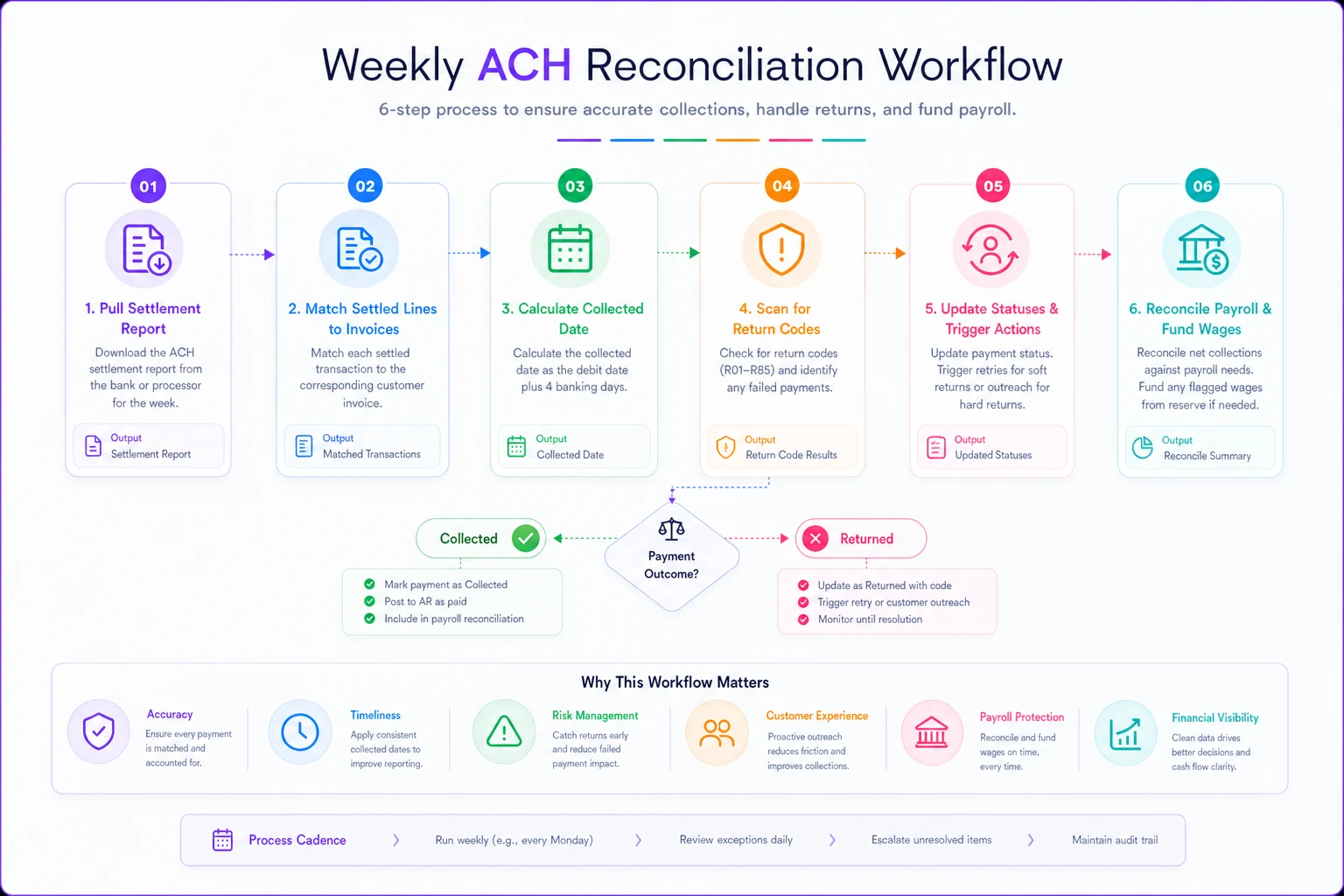
A 6-step weekly reconciliation process
Most of this takes under 20 minutes twice a week once you've built the habit. The templates above handle the tracking — this is just the sequence you run them in.
-
Pull the settlement report from your processor the morning after each batch, before anyone marks invoices paid.
-
Match each settled line to an invoice in Template 1 and stamp the Settled date.
-
Auto-calculate the Collected date (debit + 4 banking days, skipping weekends and holidays).
-
Scan for return codes on everything from the prior 1–2 weeks — returns lag, so you're always checking backward, not just the current batch.
-
Update statuses to Collected or Returned, and for returns, trigger your re-attempt or client outreach.
-
Reconcile against payroll
any wage tied to a not-yet-collected payment gets funded from reserve and flagged until it clears.
Here's a simple workflow visualizing the 6-step weekly reconciliation process.
Returns themselves are their own little workflow. An R01 is often just a timing thing — the client's paycheck landed late, you re-debit, done. An R10 is different. That's a customer dispute, and you do not retry it. Stop auto-debiting that client and talk to them first, because repeated unauthorized debits create real processor-level problems. When returns start bleeding into wage corrections or timecard disputes, that overlaps with the kind of structured fixes covered in the payroll exception playbook — same muscle, different trigger.
A real scenario
A two-crew residential cleaner running about 120 recurring clients moved most billing to ACH to avoid card fees. Good instinct — but they counted "processing" as paid and ran payroll off completed jobs. Over a rough six-week stretch they hit roughly 9–11 returns: a mix of NSF and a couple of disputes, totaling somewhere around $1,700 in reversed payments plus fees. Because they'd already paid crews on those jobs, the whole amount came straight out of operating cash with no warning. One payroll week they floated wages on the owner's personal card.
The fix wasn't new software or a new processor. They added the +4 banking-day grace rule, built the two templates above, and parked a small clearing reserve. Returns didn't stop — they never fully stop — but the surprise did. Reversals now hit a reserve that's already sized for them, and payroll stopped being a gamble on whether last week's debits held.
When gating payroll on collection makes sense — and when it doesn't
This makes sense when most of your revenue runs through recurring ACH or e-check, you pay crews weekly or biweekly, and a few returns in one week could strain the account you pay wages from. That's the majority of growing residential operations.
This is overkill when you're mostly card-based with instant decline feedback, or ACH is a small slice of volume and a return is annoying but never threatens payroll. Don't build reserve machinery for $300 of monthly ACH.
Solo operators collecting mostly cash or cards same-day can skip this entirely. You'll feel a return immediately and there's no crew payroll at risk. The calendar discipline here is built for the moment you have other people's wages riding on money that hasn't finished arriving.
The one habit to keep
Stop letting "processing" mark an invoice paid, and never fund wages from receivables that haven't cleared the return window.
The grace rule and the reserve are just mechanics. The real shift is treating ACH as money that arrives on a schedule and can leave on a schedule — and building your payroll calendar around the later of those two dates, not the earlier one.
Stop letting "processing" mark an invoice paid, and never fund wages from receivables that haven't cleared the return window. The grace rule and the reserve are just mechanics. The real shift is treating ACH as money that arrives on a schedule and can leave on a schedule — and building your payroll calendar around the later of those two dates, not the earlier one.
Ready to elevate your cleaning business?
Join 500+ cleaning services using Maidufy to save time, reduce scheduling errors, and deliver exceptional client satisfaction.