


Running a cleaning business means you're constantly proving your work happened. Photos become your insurance policy against disputes, your marketing goldmine, and sometimes your worst legal headache when handled carelessly.
The photo documentation trap most cleaning companies walk right into
It usually starts innocently. A cleaner snaps a quick before photo of a bathroom, posts an impressive transformation on Instagram, and suddenly you're dealing with an angry client who never agreed to have their home plastered across social media. Or worse, the photo you thought would protect you in a dispute contains sensitive information that violates privacy laws you didn't even know applied to you.
Most cleaning companies operate in this gray zone where photo documentation feels necessary but the rules feel murky. You need the photos for quality control and dispute resolution. Marketing wants them for social proof. But without clear operational standards, every photo becomes a potential liability sitting in a shared Google Drive folder somewhere.
Why cleaning companies struggle with photo workflows
The core issue isn't that cleaning businesses don't understand the value of photos. It's that they treat photo capture as an afterthought rather than an actual operational process that needs structure.
Never miss a cleaning appointment again.
Maidufy helps you book, confirm, and manage every cleaning service seamlessly.
- Centralized booking management
- Automated client reminders
- Optimized staff scheduling
No credit card required
Think about how it usually works. A cleaner finishes a deep clean and remembers to snap some after photos. They text them to a supervisor or dump them into a shared folder with no naming convention. Three months later, when Mrs. Henderson claims her marble countertop was damaged during cleaning, you're digging through hundreds of unnamed files trying to find evidence from that specific service date.
Meanwhile, your marketing coordinator grabs what looks like a great before/after set from the company phone and posts it on Facebook. Turns out those photos included a prescription bottle on the counter and a family photo in the background. The client sees it, and now you're doing damage control while wondering what other photos are floating around with the same problem.
Photo workflows in cleaning businesses usually evolve without much planning. Someone realizes photos help with disputes, so cleaners start taking them. Marketing sees an opportunity and starts collecting the good ones. Quality control wants documentation, so supervisors request more. Before long, you have thousands of photos scattered across devices and platforms with no clear rules about what's okay to capture, where it lives, or when it gets deleted.
Building a cleaning before after photo workflow that actually protects your business
A proper photo workflow starts with understanding that not all photos serve the same purpose. Quality assurance photos have different requirements than marketing photos. Dispute resolution documentation needs different handling than training examples.
Start by defining photo categories and their specific rules.
Quality Assurance Photos These document the condition and completion of work. They need to capture specific areas consistently but must exclude personal items and identifying information. Store these for 90 days minimum, tagged with job ID, date, and cleaner name. These never get used for marketing without additional consent.
Dispute Resolution Photos More comprehensive documentation taken when there's pre-existing damage or high-value items present. Include close-ups of any concerns, wide shots showing context, and metadata confirming when and where they were taken. Store for at least one year, encrypted if possible. Access should be limited to management only.
Marketing Photos Only captured with explicit written consent. Must follow strict composition rules — no personal items, no identifying features, no children's rooms. Store indefinitely but separately from operational photos. Always keep the original consent form linked to the photos.
The actual capture process needs clear standards too. Before starting any photo session, do a quick scan for sensitive items. Move or exclude prescription medications, personal documents, family photos, and anything that could identify the resident. If you can't avoid capturing something sensitive, that photo doesn't get taken.
Use consistent angles and lighting. Before photos should match after photos in framing — not just for quality, but because consistent documentation holds up better if you ever need to present these as evidence.
Creating consent forms that clients will actually sign
The consent conversation usually goes one of two ways. Either you spring it on clients after they've already booked, making it feel like an afterthought, or you bury it in lengthy terms they never read. Both create friction and missed opportunities.
Position photo documentation as a benefit during the sales process instead. Language that works well in practice:
"We document our work with before and after photos for quality assurance and to protect both you and our team. These photos help us maintain consistency and resolve any concerns quickly. Would you be comfortable with us photographing the cleaned areas only, with any personal items excluded?"
Then provide a simple consent form with clear options:
-
□ Yes, you may photograph cleaned areas for internal quality control only
-
□ Photos will be stored securely for 90 days then deleted
-
□ Photos will never be shared publicly or used for marketing
Extended Consent Level:
-
□ You may also use photos for training and marketing purposes
-
□ Personal items and identifying features will be excluded
-
□ I can request removal of my photos from marketing use at any time
No Consent:
-
□ Please do not photograph my property
-
□ I understand this may limit dispute resolution options
Make the consent form part of your digital booking flow or initial service agreement — not a separate step that feels like extra paperwork. When it's integrated naturally, most clients choose basic consent without pushback.
Storage systems and retention rules that won't blow up your cloud budget
Photo storage becomes a mess fast without strict rules. A cleaning company running 300 jobs a month generates roughly 3,600 photos if teams take around 12 per job. Within a year, you're looking at 40,000+ files eating up storage and making it nearly impossible to find anything specific when you actually need it.
A retention framework that balances protection with practicality:
| Retention Period | What to Keep | What to Delete | Storage Action |
|---|---|---|---|
| 0–7 days | All photos | Nothing yet | Local device + cloud sync |
| 7–90 days | All completed job photos | Duplicates, accidental sensitive captures | Organized cloud folders by Month > Week > Job ID |
| 90 days–1 year | Jobs with complaints, claims, high-value properties | Routine QA photos with no issues | Compress and archive |
| 1+ years | Active disputes, marketing with permanent consent | Everything else | Annual purge schedule |
Use folder naming like "2024-03-15JobID8847Smith_Photos" rather than relying on photo metadata alone. Makes both manual searches and automated workflows much easier to manage.
Photo checklists that eliminate confusion in the field
Your field teams need simple, repeatable processes. A complicated photo protocol means inconsistent execution. Here's a checklist format that actually gets followed:
Pre-Service Photo Checklist:
-
1. Check for visible damage, stains, or concerns
-
2. Remove or exclude personal items from frame
-
3. Capture
entry area, each room's general condition, any specific problem areas noted by client
-
4. Use landscape orientation for all photos
-
5. Include a reference point for scale when documenting damage
Post-Service Photo Checklist:
-
1. Capture same angles as pre-service photos
-
2. Ensure all cleaning supplies are out of frame
-
3. Show
completed work areas, any special requests completed, overall transformation
-
4. Take close-ups of detailed work (faucets, baseboards, etc.)
-
5. Verify no personal items visible before saving
Special Situation Documentation:
-
Pet areas
Document any pre-existing damage or stains
-
Valuable items
Wide shot showing items weren't moved or touched
-
Access issues
Photo of locked rooms, blocked areas
-
Supply issues
Empty dispensers, broken equipment the client should address
Laminated cards with these checklists work reasonably well for field teams. Or build them into a mobile app workflow where photos get tagged automatically as they're captured. The point is making the right process easier than the wrong one.
Photo workflow process: from capture to compliant storage
Here's how a complete end-to-end photo workflow should flow for each job:
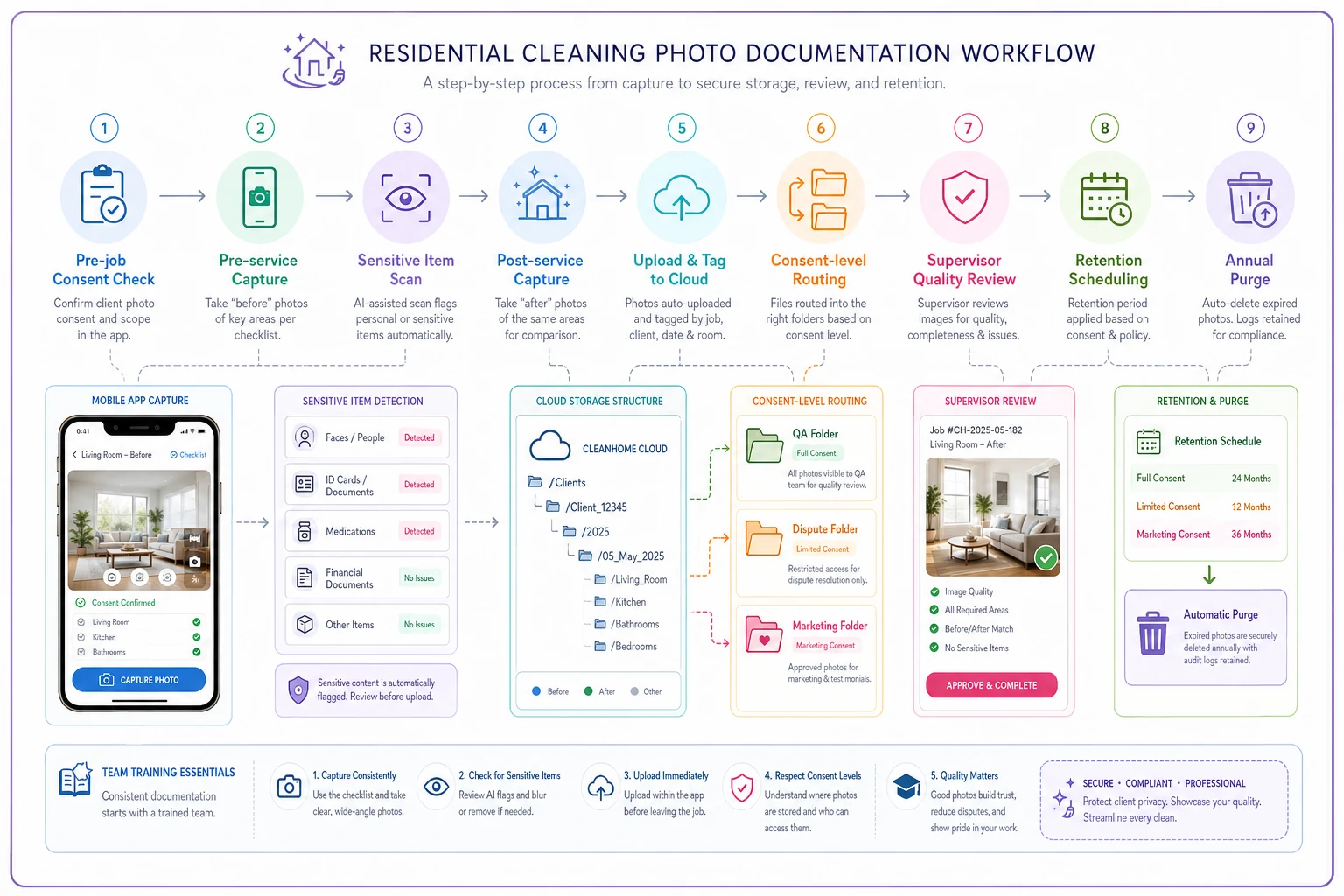
Use this visual as a quick reference for training and audits.
-
1. Pre-job consent check — Verify client consent level before any photos are taken
-
2. Pre-service capture — Follow pre-service checklist, tag photos with job ID and date immediately
-
3. Sensitive item scan — Review frames before saving; exclude or retake anything with personal items visible
-
4. Post-service capture — Match angles from pre-service photos, verify supplies are out of frame
-
5. Upload and tagging — Transfer to organized cloud folder with standardized naming convention
-
6. Consent-level routing — Photos sorted into QA, dispute, or marketing folders based on client consent
-
7. Quality review — Supervisor spot-check within 7-day buffer window
-
8. Retention scheduling — Automatic deletion or archive flagging triggered by job type and consent level
-
9. Annual purge — Remove all photos outside active dispute, legal, or permanent-consent categories
Putting this in a visual format for your team makes the steps harder to skip and easier to train new hires on.
When photo automation keeps you compliant without the manual work
Manual photo management breaks down as you scale. When you're running 20 jobs a week, you can personally review photos. At 200 jobs a week, you need systems handling the bulk of the work automatically.
This is where AI-powered operational software turns a complex compliance challenge into a background process. Instead of relying on cleaners to remember consent levels and retention rules, the system enforces them. When a cleaner uploads photos, the platform checks them against the client's consent level. Marketing photos get routed to permanent storage. QA photos get scheduled for automatic deletion at 90 days.
Modern cleaning management platforms can also flag potential privacy concerns using image recognition, tag photos automatically with job information, and generate audit trails without anyone manually tracking anything. When a client updates their consent preferences, the system adjusts how their photos are handled going forward — no manual intervention required.
The operational side has value too. AI automation can analyze before/after photos to score cleaning quality, identify areas that get missed regularly, and help estimate time requirements for similar future jobs. Photos stop sitting unused in folders and start generating actual operational insight. If a dispute comes up, relevant photos surface instantly rather than requiring someone to dig through thousands of files.
Common photo workflow mistakes that create legal exposure
Some mistakes look minor until they blow up. Here are the ones that cause real problems:
Mixing personal and company devices. When cleaners use personal phones for work photos, you lose control over storage, sharing, and deletion. Those photos might sync to personal cloud accounts, get shared with friends, or stay on devices long after employment ends. Company devices with managed storage solve this completely.
Vague consent language. "We may take photos" doesn't hold up legally. Specify what types of photos, for what purposes, and how long they'll be kept. Vague consent is often legally equivalent to no consent.
Inconsistent deletion practices. Saying you delete photos after 90 days means nothing if they're still sitting on three devices and two cloud platforms. Centralized storage with automated retention is the only way to make your policy actually enforceable.
No access controls. If every employee can access all photos, you're one disgruntled team member away from a privacy breach. Operational photos need different access levels than marketing content.
Forgetting about metadata. Photos contain timestamp and sometimes location data. When you share before/after photos publicly, you may inadvertently reveal when homes are empty and exactly where they're located. Strip metadata before any public use.
Making photos work for operations, not against them
Companies getting this right treat photos as operational data, not just visual records. A solid cleaning before after photo workflow does more than prevent disputes — it becomes a tool for training, quality improvement, and steady marketing content.
When you have clear standards, every photo serves its intended purpose without creating new risks. Teams know exactly what to capture. Clients trust you because you've been upfront about photo use. Marketing has a pipeline of properly consented content. And when disputes arise, documentation is accessible in seconds.
The shift from chaotic photo practices to a structured workflow typically takes about a month to fully implement. Week one covers consent forms and basic capture standards. Week two sets up storage organization and naming conventions. Week three adds retention rules and deletion schedules. Week four reinforces training and adds quality checks.
The payoff shows up quickly in reduced disputes and better client trust. Long-term, you build a library of properly consented marketing content and training materials while staying ahead of privacy regulations that are only going to get more stringent. Photo documentation is a core part of professional cleaning services at this point — the question is whether you're controlling the process or letting it quietly build up risk in the background.
Ready to elevate your cleaning business?
Join 500+ cleaning services using Maidufy to save time, reduce scheduling errors, and deliver exceptional client satisfaction.