



Most small cleaning companies lose 90-120 minutes daily to poor routing. Not because they're bad at logistics, but because standard mapping apps weren't built for service businesses juggling 8-15 stops with specific time windows, varying clean durations, and clients who text last-minute changes.
The typical cleaning crew starts their day with a printed list or phone notes, plugging addresses into Google Maps one by one. By noon, they've crossed the same highway three times, doubled back through downtown traffic twice, and spent 40 minutes sitting in school pickup zones because nobody thought about timing when building the schedule.
Route optimization for a cleaning business doesn't need expensive software or complex algorithms. The most successful small cleaning operations use simple geographic rules and time-window patterns that anyone can implement with a whiteboard and basic map knowledge.
Why cleaning routes break differently than delivery routes
Cleaning services face routing challenges that standard logistics approaches miss entirely. A delivery driver drops packages and moves on. Your crews spend 45-180 minutes at each location, which makes traditional route optimization models basically useless.
The real complexity is overlapping constraints. Mrs. Peterson needs her clean before 2pm for book club. The Johnson family can't have anyone there during the baby's 11am-1pm nap. Office buildings want evening service. Meanwhile, your crew needs to hit 7-8 homes between 8am and 5pm while avoiding school zones at 3pm and rush hour bridges after 4:30pm.
Standard mapping software sees addresses as dots on a map. In cleaning operations, each stop represents:
-
60-150 minutes of work time
-
Specific arrival windows
-
Parking availability patterns
-
Traffic flow that changes throughout the day
-
Client preferences that override geographic logic
One cleaning company in suburban Atlanta tracked their actual vs planned routes for two weeks. Their morning crew was scheduled for "optimal" routing according to Google Maps, yet averaged 87 minutes in transit for jobs that mapping software said should take 42 minutes total. The difference? School zones, train crossings, and the reality that you can't turn left onto Peachtree Street between 7-9am without waiting through three light cycles.
Geographic batching: your foundation for manual routing
Geographic batching means grouping clients by neighborhood rather than trying to optimize individual routes every day. It trades perfect efficiency for predictable operations and easier scheduling.
Never miss a cleaning appointment again.
Maidufy helps you book, confirm, and manage every cleaning service seamlessly.
- Centralized booking management
- Automated client reminders
- Optimized staff scheduling
No credit card required
Start by dividing your service area into zones based on natural boundaries and traffic patterns, not arbitrary lines.
Natural zone boundaries:
-
Highways and major roads that split traffic flow
-
Rivers, lakes, or geographic features
-
School district lines (these affect traffic more than people realize)
-
Downtown vs suburban vs rural density changes
-
Bridge or tunnel bottlenecks
A Charlotte-based cleaning service divided their territory into 7 zones using I-77 and I-485 as primary boundaries, then subdivided by school district. Each zone gets assigned specific service days — Mondays and Thursdays for Zone 1 (Ballantyne area), Tuesdays and Fridays for Zone 2 (University area), and so on.
This seems less efficient than pure optimization, but it creates real operational benefits:
-
Crews learn the traffic patterns in their zones
-
They build relationships with local parking attendants
-
Supply restocks can be planned by zone
-
Substitute cleaners can follow established routes
-
Clients know their service happens on "zone days"
Keep zones sized so one crew can handle 6-8 regular cleans.
Building your zone map
Pull up a basic map of your service area. Mark your existing clients with dots. You'll usually see natural clusters around suburban developments, downtown condo buildings, office parks, and school districts where families started recommending you to each other.
Draw boundaries that keep those clusters together while respecting major traffic barriers. A highway might look like the logical dividing line, but if there's only one bridge crossing it, you might need to keep both sides in the same zone to avoid that bottleneck eating time every day.
Keep zones sized so one crew can handle 6-8 regular cleans. Bigger zones mean too much travel between stops. Smaller zones leave gaps when clients cancel.
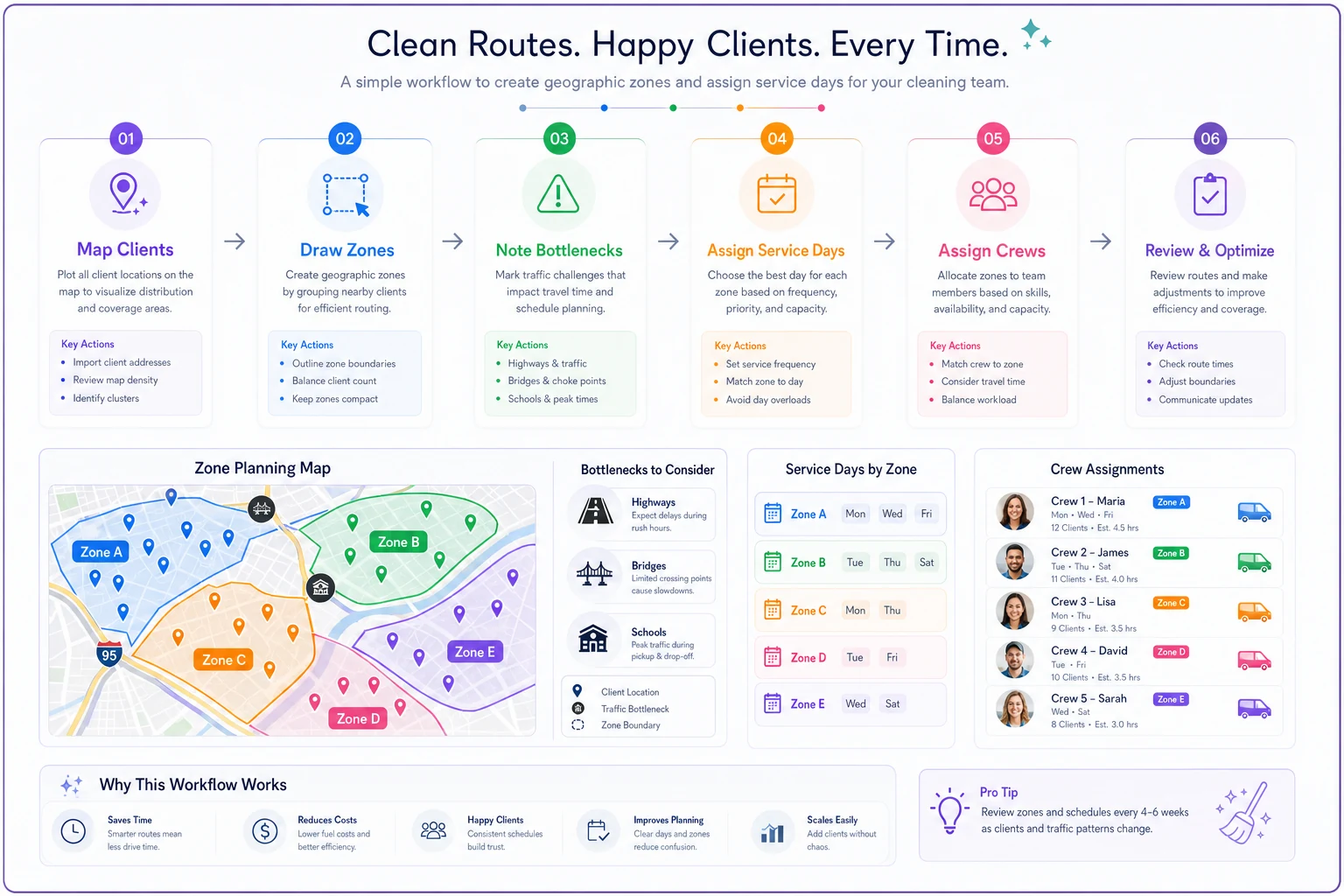
A quick visual like this helps teams agree on boundaries and service days.
Time-window Tetris: fitting client preferences into driveable routes
Within each zone, you're playing scheduling Tetris with client time preferences. The trick is categorizing clients by actual flexibility rather than just their stated preference.
Client flexibility categories:
Hard constraints (cannot be moved):
-
Before kids get home from school (usually 2
30pm)
-
After morning work calls (post-10am)
-
Must be home for security (specific 2-hour window)
-
Medical appointments or therapy schedules
Soft preferences (negotiable with some flexibility):
-
"Morning is better" but afternoon works
-
"Usually Tuesdays" but any weekday is fine
-
Prefers to be home but trusts you with a key
Fully flexible (anytime works):
-
Vacant properties
-
Offices with off-hours access
-
Long-term clients who gave you garage codes
-
Airbnb properties between guests
Map these constraints within each zone. A typical zone might have two hard morning constraints, three soft afternoon preferences, four fully flexible slots, and one evening office clean. Start with hard constraints as anchors, fill in soft preferences where they fit geographically, then use flexible slots as buffers between time-sensitive stops.
The 15-minute buffer rule
Every experienced cleaning crew learns this the hard way: never schedule back-to-back hard constraints. If Mrs. Chen needs service between 10am-noon and Mr. Williams needs 12:30-2:30pm, that looks fine on paper. In reality, any delay at the first home cascades directly into missing the second window.
Build 15-minute buffers between hard constraints. Use that time for travel wiggle room, quick supply restocks, bathroom breaks, dealing with unexpected pet messes, or calling ahead to the next client.
These buffers feel inefficient until the day you're running 45 minutes behind at 4pm with three more homes to hit.
Simple heuristics that beat complex algorithms
Forget traveling salesman algorithms. Real cleaning routes follow predictable patterns that simple rules handle better than optimization software.
The Morning Momentum rule: Start farthest from base, work your way back. It sounds backwards, but morning traffic flows outward from residential to commercial areas. Crews have more energy for longer drives at 7am than at 4pm, and fighting outbound traffic in the morning means easier travel as the day progresses.
The School Zone Avoidance pattern: Plot elementary schools on your zone maps. Mark 2:30-3:45pm as no-travel windows around them. A 5-minute drive becomes 20 minutes when you're stuck behind school buses. Plan routes so crews are inside homes — not on roads — during school release times.
The Parking Hierarchy method:
-
Homes with driveways (easy, anytime)
-
Apartments with visitor spots (usually available)
-
Street parking with no restrictions
-
Metered street parking (expensive but guaranteed)
-
Buildings requiring garage passes (most complex)
Hit the difficult parking early when spots are available. Save driveways for afternoon when street parking becomes a nightmare.
The Bridge and Train Timer: If your zone includes drawbridges, train crossings, or ferry schedules, those become hard timing constraints. One Miami cleaning service structures their entire Beach zone around a freight train that blocks the causeway three times daily for 12-15 minutes. They know to be across by 10:45am, wait until 11:05am, or plan lunch during the crossing. It sounds like a small thing until you've sat at that crossing four times in one week.
Sample day maps: what working routes actually look like
Dense Urban Zone (Downtown/Midtown)
Morning (8am-12pm):
-
Start
Office building with 6am-noon access window (furthest from base)
-
Stop 2
Condo building with concierge (8am-5pm flexible)
-
Stop 3
Street-level apartment (metered parking fills after 9am)
-
Stop 4
Brownstone with resident parking permit provided
| Period | Stops |
|---|---|
| Morning (8am-12pm) | Start: Office building with 6am-noon access window (furthest from base); Stop 2: Condo building with concierge (8am-5pm flexible); Stop 3: Street-level apartment (metered parking fills after 9am); Stop 4: Brownstone with resident parking permit provided |
| Afternoon (12pm-5pm) | Lunch break during peak parking turnover; Stop 5: Loft with afternoon preference (owns spot in garage); Stop 6: Apartment with driveway (flexible timing); Stop 7: Evening office clean (after 5pm start) |
Afternoon (12pm-5pm):
-
Lunch break during peak parking turnover
-
Stop 5
Loft with afternoon preference (owns spot in garage)
-
Stop 6
Apartment with driveway (flexible timing)
-
Stop 7
Evening office clean (after 5pm start)
This route respects parking patterns, avoids lunch-hour traffic, and ends with an evening clean that extends the workday without adding extra travel.
Suburban Family Zone
Morning (7:30am-12pm):
-
Start
Empty house for sale (completely flexible, far from base)
-
Stop 2
Work-from-home client (must be 9:30am-11:30am quiet hours)
-
Stop 3
Flexible stay-at-home parent (appreciates morning but not required)
Afternoon (12pm-4:30pm):
-
Stop 4
Retired couple (home all day, happy to chat with the crew)
-
Break during school pickup chaos (2
30-3:30pm)
-
Stop 5
After-school family (needs clean done before 3:45pm kid return)
-
Stop 6
Working couple (wants 4pm or later arrival)
Notice how school schedules become the primary constraint here, not distance. The route accepts longer travel to respect time windows, which is usually the right trade.
Mixed Residential-Commercial Zone
Morning (7am-11:30am):
-
Start
Medical office (must be done before 8:30am opening)
-
Stop 2
Dental practice (before 9am patients)
-
Stop 3
Morning-preference house (works from home after lunch)
Midday transition (11:30am-1pm):
Travel to residential area during lunch traffic Supply restock if needed
Afternoon (1pm-5:30pm):
-
Stop 4
Naptime house (baby sleeps 11am-1pm)
-
Stop 5
Flexible client (buffer for delays)
-
Stop 6
After-work apartment (arrives home at 5:45pm)
Commercial properties anchor the morning. The route then transitions to residential as business hours kick in and home workers need quiet spaces.
When zone-based routing starts breaking down
Geographic batching works well until you're managing around 40-50 regular clients per crew. Past that, the cracks start showing.
-
Zone imbalance Popular zones book solid while others have gaps. You're turning away clients in busy zones while crews sit idle in slower areas.
-
Time-window conflicts multiply With 10+ clients per zone, somebody always needs a slot that's already taken. The Tetris board gets too complex to solve manually.
-
Sick day chaos When a crew calls out, redistributing 8-10 clients across other zones that same day becomes nearly impossible without software.
-
Growth bottlenecks Adding new crews means splitting zones, which disrupts existing client relationships and the local knowledge crews have built up.
This is typically when cleaning companies start exploring route optimization cleaning business software that can handle dynamic scheduling while preserving the zone-based foundation you've already built.
The paper map to digital transition
Smart cleaning companies don't abandon geographic batching when they adopt routing software — they use their hard-won zone knowledge to configure better digital systems.
Zones become geo-fences in the software. Time-window patterns become scheduling templates. School-zone avoidance times get programmed as blackout periods. The software handles complex optimization within the framework you've already proven works.
Many cleaning businesses find that AI-powered operational platforms can maintain a zone-based approach while automating the daily Tetris game of fitting time windows together. These platforms can learn your specific traffic patterns, track which clients are genuinely flexible versus just being polite about it, and automatically adjust when someone calls in sick. The transition typically cuts daily routing planning from 45-60 minutes of morning scrambling down to about 5 minutes of verification. Crews get routes on their phones with navigation that actually accounts for service business timing, not just distances between dots.
Making manual routing sustainable as you grow
Manual routing works best with consistent patterns and clear documentation. Build these systems before you desperately need them:
-
Zone ownership model
Assign specific crews to specific zones. They learn every shortcut, every parking trick, every traffic quirk. Crews that "own" their zones tend to improve route efficiency by around 20% after the first month just from accumulated local knowledge.
-
Client time-window database
Track not just preferences but actual flexibility. Note who's genuinely constrained versus who just stated a preference. When schedules need reshuffling, you know exactly who to call first.
-
Traffic pattern calendar
Mark recurring bottlenecks — farmers markets that close streets on Saturdays, stadium events that cripple downtown, construction seasons that reroute highways. Build routes that avoid predictable problems before they happen.
-
Float crew system
Keep one flexible crew that can work any zone. They handle sick days, unusually busy stretches, and let you test new zone boundaries without disrupting established routes.
The best cleaning companies treat routing as an operational skill worth developing, not just a morning scramble. They document what works, train new crews on established patterns, and refine based on actual drive times rather than estimates.
Eventually, growth makes pure manual routing impractical. But companies that build strong geographic foundations and time-window systems find the transition to automated routing much smoother. Software augments the human knowledge rather than trying to replace it from scratch.
Start with zones, refine with experience
Route optimization for a cleaning business doesn't require complex software or perfect algorithms. Map your clients, draw smart zone boundaries, establish service days for each area, and build routes that respect time windows and traffic — not just distances. Use simple rules like morning momentum and parking hierarchies to sequence stops logically.
Document what works. That knowledge becomes invaluable whether you're training new crews, handling emergency reschedules, or eventually moving to routing software that can scale your approach.
The cleaning companies that grow successfully don't chase mathematically perfect routes. They build sustainable patterns that crews can execute consistently, clients can rely on, and operations can manage without daily chaos. Geographic batching might seem less sophisticated than algorithmic optimization, but for teams under 10 crews, it's usually the difference between profitable growth and operational meltdown.
Ready to elevate your cleaning business?
Join 500+ cleaning services using Maidufy to save time, reduce scheduling errors, and deliver exceptional client satisfaction.